1
This material is copyright and is licensed for the sole use by Thomas Rosenblum on 4th December 2008
1010 SW High Ave., , Topeka, , 66604
Chapter 8
3. Copy them at least monthly, down to a hard drive, and put them on a RW
CD-ROM or DVD for safekeeping. You could also put them on a flash drive,
and rotate them (that is, overwrite them) every three months or so. One
exception to this is that if you have a breach or break in, these logs should be
kept for incident response, legal action, or more. You should write them to a
CD or DVD and have multiple copies of them.
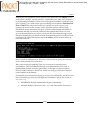
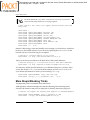
4. Use Apache to do a log rotation:
mv access_log access_log.old
mv error_log error_log.old
apachectl graceful
sleep 600
gzip access_log.old error_log.old
See: http://sourceforge.net/projects/log-rotator/
http://httpd.apache.org/docs/1.3/logs.html#rotation
The key to successful log management is to set up a solid plan (and follow it) to
review logs for bad behavior, copy down the logs for safekeeping (time dependent),
and to not let the logs fill up causing a denial of service due to potential crashing or
halts of the web server.
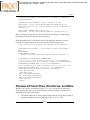
Tools to Review Your Log Files
Having the right tool for the right job is important. Pulling down a text file of raw
logs is not my idea of a cool glass of wine and an easy chair to read it in. As the
administrator of your site, you need to have tools and (of course) processes in place
to monitor your log files on a regular basis.
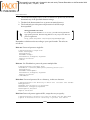
Here are a few of my favorites and, depending on your host, you might have some
of them.
We'll start out with discussing a few Joomla!-based tools. Then we'll look at several
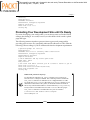
tools that are generally available from most hosts, often available through the cPanel
or other equivalent tools.
Let's examine these tools.
[ 181 ]