1
Index
USER M ANUAL ......................................................................................................................................... 1
Index .................................................................................................................................................... 2
INTRODUCTION ......................................................................................................................................... 3
Plug-in mode........................................................................................................................................ 3
Stand–alone mode................................................................................................................................ 3
REQUIREMENTS ......................................................................................................................................... 3
Video Codecs ......................................................................................................................................... 3
INSTALLATION .......................................................................................................................................... 3
BEFORE STARTING KARAOKI ..................................................................................................................... 4
In Plug-in Mode. ...................................................................................................................................... 4
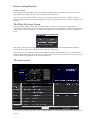
THE MODE SELECTION SCREEN. ................................................................................................................ 4
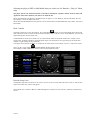
THE MAIN SCREEN..................................................................................................................................... 4
Selecting the player in DEX or Red Mobile that you wish to use for Karaoke. (“Plug–in” Mode only) ........ 5
Deck Controls .......................................................................................................................................... 5
Karaoke Song Cases................................................................................................................................. 5
Case Song List ......................................................................................................................................... 6
Scan Folder.............................................................................................................................................. 7
Scan .................................................................................................................................................... 7
Change Path......................................................................................................................................... 7
Only Add If Song Is Not In Case .......................................................................................................... 7
Scan Using ‘Karaoke Naming Conventions’ ......................................................................................... 8
Edit Track Popup. ................................................................................................................................ 9
Trim Tracks ......................................................................................................................................... 9
Searching for a song............................................................................................................................. 9
Singer Rotation ...................................................................................................................................... 10
Graphics Buttons.................................................................................................................................... 11
Output Screen. ....................................................................................................................................... 11
MultiPlexed Karaoke Files (Stand-Alone Mode Only) ............................................................................. 12
Played History Screen ............................................................................................................................ 13
History Review Screen ........................................................................................................................... 13
Singer Database ..................................................................................................................................... 14
THE BACKGROUND MUSIC PLAYER (STAND-ALONE MODE ONLY)............................................................. 15
Adding Music to the BGM Player. .......................................................................................................... 16
Using the BGM Player ........................................................................................................................... 16
Silence Detector..................................................................................................................................... 16
THE OPTIONS BUTTON MENU................................................................................................................... 16
Changing the Text Size........................................................................................................................... 17
Auto Cue (stand-alone mode only).......................................................................................................... 17
Auto Karaoke......................................................................................................................................... 17
THE CONFIG SCREEN ............................................................................................................................... 17
Startup Mode ......................................................................................................................................... 18
Selection a sound device..................................................................................................................... 19
Speaker Assignment........................................................................................................................... 19
Buffer................................................................................................................................................ 19
Player Progress Bar Option..................................................................................................................... 19
Max Singers On Screen .......................................................................................................................... 20
Tool Tips ............................................................................................................................................... 20
Console.................................................................................................................................................. 20
High Priority.......................................................................................................................................... 20
News Ticker........................................................................................................................................... 20
Pitch Bend ............................................................................................................................................. 20
Loading ................................................................................................................................................. 20
Auto Delete ....................................................................................................................................... 20
Pause on load..................................................................................................................................... 20
Show CDG Graphics When Paused. ................................................................................................... 20
Background Music Automation option................................................................................................ 21
Screen 2 Background Image ................................................................................................................... 21
Tempo/Key Set up.................................................................................................................................. 21
Menu Color............................................................................................................................................ 21
Auto Karaoki Timer ............................................................................................................................... 21
Using ‘Remote Request Stations ............................................................................................................. 21
CTRL-KEY COMMANDS ........................................................................................................................... 23
2 of 23