1
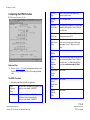
ACADEMIC ACTIONS The EEID Processing Steps Completing the EEID Function 1. Enter data in the following fields, as applicable: Employee ID Do not enter; system will derive random number SSN Nine-digit social security number, without hyphens. First Name Employee’s first name. First, middle, and last names must match Social Security Card. Middle Name Employee’s middle initial. Last Name Employee’s last name. The system will accept a maximum of 26 characters for all three names together. Suffix If applicable. Any suffix to the employee’s last name, such as Jr. or III. Do not include any degree information, such as MD or Ph.D., in the suffix field. Result System-derived employee name. Date of Birth Employee's date of birth in the format MMDDYY. Intercampus Transfer Y/N THE EEID (EMPLOYEE IDENTIFICATION) FUNCTION Notes and Tips Do not enter commas or periods in the first, middle, or last name fields. Use F1 Help for field-level or screen-level on-line help. 2. Press Enter to invoke range/value edits. 3. Press F11 Next Func to continue to the next function. 7.2—3 Payroll/Personnel System February 2012, University of California, Santa Cruz Academic New Hire PPS User Manual