1
2 | ENGLISH
EM6104R1 / EM6108R1 Surveillance Recorder
Table of contents
1.0 Introduction ........................................................................................................... 3
1.1 Packing contents ............................................................................................... 3
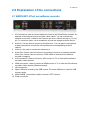
2.0 Explanation of the connections .............................................................................. 4
2.1 EM6104R1 4 Port surveillance recorder ............................................................ 4
2.2 EM6108R1 8 Port surveillance recorder ............................................................ 5
3.0 Using the surveillance recorder ............................................................................. 5
3.1 Connecting the surveillance recorder to your television or monitor ..................... 5
3.2 Connecting the mouse to the surveillance recorder ........................................... 6
3.3 Connecting the surveillance recorder to your network ........................................ 6
3.4 Connecting the surveillance recorder to the power grid...................................... 6
3.5 Installing the surveillance recorder’s software (optional) .................................... 6
4.0 Using the setup wizard .......................................................................................... 7
5.0 Manual settings ..................................................................................................... 9
5.1 Setting up passwords ........................................................................................ 9
5.1.1 Setting up a user account ........................................................................... 9
5.1.2 Setting up an admin account ...................................................................... 9
5.2 Setting up date and time .................................................................................. 10
5.3 Setting up network settings .............................................................................. 10
5.4 Selecting the screen language......................................................................... 11
6.0 Connecting a camera .......................................................................................... 12
6.1 Connecting a (regular) coaxial camera ............................................................ 12
6.2 Checking the cameras image .......................................................................... 12
6.3 Connecting a PTZ camera ............................................................................... 13
6.4 Setting up the surveillance recorder for PTZ usage ......................................... 13
6.5 Checking the PTZ camera ............................................................................... 14
6.6 Adjusting the surveillance recorder’s resolution ............................................... 14
7.0 Making recordings ............................................................................................... 15
7.1 Resolution and bit rate of the recordings .......................................................... 15
7.2 Recording manually ......................................................................................... 16
7.3 Recording continuously ................................................................................... 16
7.4 Recording during motion detection .................................................................. 16
7.5 Time based recording with motion detection .................................................... 17
8.0 Setting up an alarm notification............................................................................ 18
8.1 Setting up an alarm notification during motion detection .................................. 18
8.2 Sending an email during alarm notification....................................................... 18
9.0 Control the recordings of the surveillance recorder .............................................. 19
9.1 Searching for recordings at a specific time....................................................... 19
9.2 Making a backup of a recording ....................................................................... 20
10.0 Accessing the surveillance recorder locally ........................................................ 21
10.1 Take a snapshot using the web interface ....................................................... 21
10.2 Recording using the web interface ................................................................. 22