1
Contents
VoIP Telephone Adaptor/Router settings ................................................................. 4
Chapter 1 Introduction ......................................................................................... 5
1.1
Product Overview ...................................................................................... 5
1.2
Features ................................................................................................... 6
1.3
Application ............................................................................................... 8
1.4
System Minimum Requirements ................................................................... 9
1.5
Your Broadband Connection Bandwidth Consideration ..................................... 9
1.6
Package Contents .................................................................................... 10
1.7
Front Panel LED Indicators ........................................................................ 11
1.8
Back Panel and Wiring .............................................................................. 12
1.9
Power-up, Boot and Reset ......................................................................... 12
Chapter 2 Quick Start ........................................................................................ 13
2.1
Before you begin ..................................................................................... 13
2.2
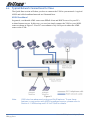
Typical Network Connections for V200 ........................................................ 14
2.3
Installation ............................................................................................. 16
2.3.1 Cable Connections ................................................................................... 16
2.3.2 Power on your V200 and PC ...................................................................... 16
2.3.3 Connecting to V200 ................................................................................. 16
2.3.4 Configure the V200 via Web browser .......................................................... 19
Chapter 3 How to Log-in using a Web Browser....................................................... 24
3.1
V200 IP Address ...................................................................................... 24
3.2
Web Login .............................................................................................. 24
Chapter 4 WAN and LAN Set-up ........................................................................... 25
4.1
WAN Setup ............................................................................................. 25
4.1.1 Static IP address ..................................................................................... 27
4.1.2 DHCP Mode ............................................................................................ 28
4.1.3 PPPoE .................................................................................................... 29
4.2
LAN IP Address ....................................................................................... 30
Chapter 5 VoIP Setup ......................................................................................... 31
5.1
SIP ........................................................................................................ 31
5.1.1 Configuration .......................................................................................... 31
5.1.2 STUN ..................................................................................................... 35
5.1.3 Phone Book ............................................................................................ 36
5.1.4 Call Forward ........................................................................................... 37
5.1.5 Dial Plan ................................................................................................ 39
5.2
VoIP QoS ................................................................................................ 41
Chapter 6 Additional Routing Features .................................................................. 43
6.1
NAT Port Forwarding ................................................................................ 43
6.2
DMZ ...................................................................................................... 44
6.3
Access Control ........................................................................................ 45
6.4
Remote Access ........................................................................................ 46
Chapter 7 V200 System Information .................................................................... 47
7.1
Status .................................................................................................... 47
7.2
Traffic Statistics....................................................................................... 48
7.2.1 Interface Statistics................................................................................... 48
7.2.2 TCP-IP ................................................................................................... 49
2
YML795 Rev1
V200 VoIP Telephone Adaptor/Router