1
Chapter 9: Maintenance and Troubleshooting
Special Instructions
1
2
3
4
5
6
7
8
9
10
11
12
13
14
A
B
C
D
9–12
There are several instructions that can be used to help you debug your program during
machine startup operations.
• END
• PAUSE
• STOP
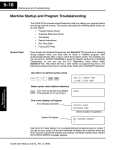
END Instruction: If you need a way to quickly disable part of the program, just insert an
END statement prior to the portion that should be disabled. When the CPU encounters the
END statement, it assumes that is the end of the program. The following diagram shows an
example.
New END disables X10 and Y1
Normal Program
X0
X2
X1
X3
Y0
X4
X0
X2
X1
X3
Y0
X4
Y1
X10
END
Y1
X10
END
END
PAUSE Instruction: This instruction provides a quick way to allow the inputs (or other logic)
to operate while disabling selected outputs. The output image register is still updated, but the
output circuits are not. For example, you could make this conditional by adding an input
contact or CR to control the instruction with a switch or a programming device. Or, you
could just add the instruction without any conditions so the selected outputs would be
disabled at all times.
PAUSE disables Y0 and Y1
Normal Program
X0
X2
X1
X3
Y0
Y0 – Y1
PAUSE
X10
X4
Y1
X0
X2
X1
X3
X10
Y0
X4
Y1
END
END
STOP Instruction: Sometimes during machine startup you need a way to quickly turn off all
the outputs and return to Program Mode. You can use the STOP instruction. When this
instruction is executed the CPU automatically exits Run Mode and enters Program Mode.
Remember, all outputs are turned off during Program Mode. The following diagram shows an
example of a condition that returns the CPU to Program Mode.
DL06 Micro PLC User Manual; 2nd Ed., 3/04