1
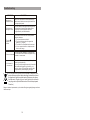
Troubleshooting
PROBLEM
SOLUTION
No sound or
distorted sound
Make sure the machine is connected properly.
Make sure all cables are securely inserted into
the appropriate jacks.
Can't advance
through a movie
You can't advance through the opening credits
and warning information that appears at the
beginning of movies because the disc is
programmed to prohibit that action.
The icon
appears on
screen
The feature or action cannot be completed at
this time because:
1. The disc's software restricts it.
2. The disc's software doesn't support the
feature (e.g., angles)
3. The feature is not available at the moment.
4. You've requested a title or chapter number
that is out of range.
The disc might be damaged. Try another disc;
Picture is distorted It is normal for some distortion to appear during
forward or reverse scan.
No forward or
reverse scan
Some discs have sections that prohibit rapid
scanning or chapter skip;
If you try to skip through the warning information
and credits at the beginning of a movie, you
won't be able to. This part of the movie is often
programmed to prohibit skipping through it.
If at any time in the future you should need to dispose of this
product please note that waste electrical products should not
be disposed of with household waste. Please recycle where
facilities exist. Check with your Local Authority or retailer for
recycling advice.(Waste Electrical and Electronic equipment
Directive)
Owing to continuous improvement, no prior notice will be given regarding changes on above
feature and spec.
18