1
.PS
cct_init
# Pic input begins with .PS
# Read in macro definitions and set defaults
elen = 0.75
# Variables are allowed; default units are inches
Origin: Here
# Position names are capitalized
source(up_ elen); llabel(-,v_s,+)
resistor(right_ elen); rlabel(,R,)
dot
{
# Save the current position and direction
capacitor(down_ to (Here,Origin))
#(Here,Origin) = (Here.x,Origin.y)
rlabel(+,v,-); llabel(,C,)
dot
R
+
}
# Restore position and direction
+
line right_ elen*2/3
vs
v
−
inductor(down_ Here.y-Origin.y); rlabel(,L,); b_current(i)
−
line to Origin
.PE
# Pic input ends
i
C
L
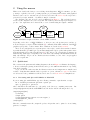
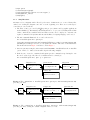
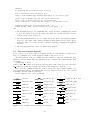
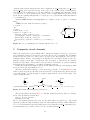
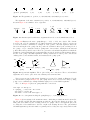
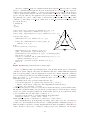
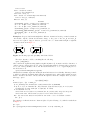
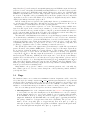
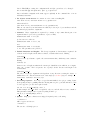
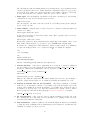
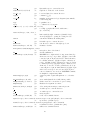
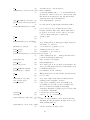
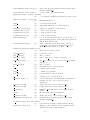
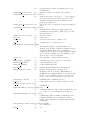
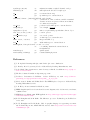
Figure 2: The file quick.m4 and resulting diagram. There are several ways of drawing the same
picture; for example, nodes (such as Origin) can be defined and circuit branches drawn between
them; or absolute coordinates can be used (e.g., source(up from (0,0) to (0,0.75)) ). Element sizes and styles can be varied as described in later sections.
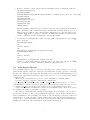
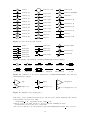
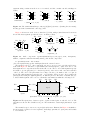
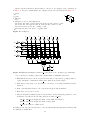
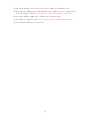
The effect of the m4 command above is shown in Figure 3. Configuration file pstricks.m4
causes library libgen.m4 to be read, thereby defining the macro cct init. The diagram source file
is then read and the circuit-element macros in libcct.m4 are defined during expansion of cct init.
pstricks.m4
.pic
m4
libgen.m4
Configuration file
Diagram source quick.m4
···
define(‘cct init’,...)
···
libcct.m4
···
define(‘resistor’,...)
···
.PS
cct init
···
Figure 3: The command m4 -I installdir pstricks.m4 quick.m4 > quick.pic.
To produce Tikz PGF code, the commands are modified to read pgf.m4 and invoke the -g
option of dpic as follows:
m4 -I installdir pgf.m4 quick.m4 > quick.pic
dpic -g quick.pic > quick.tex
The LATEX header should contain \usepackage{tikz}, but the inclusion statemensts are the
same as for PSTricks input. Invoking PDFlatex on the source produces .pdf output directly.
In all cases the essential line is \input quick, which inserts the previously created file quick.tex.
2.1.2
Processing with gpic
If your printer driver understands tpic specials and you are using gpic (on some systems the gpic
command is pic), the commands are
m4 -I installdir gpic.m4 quick.m4 > quick.pic
gpic -t quick.pic > quick.tex
and the figure inclusion statements are as shown:
\begin{figure}[hbt]
3