1
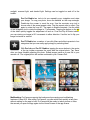
6x Full-Resolution Zoom: ProCameraʼs Full-Res Zoom automatically
improves the quality of zoomed photos. Images are resampled up to full
device resolution. To zoom in and out, use the pinch gesture (with two
fingers) or the zoom slider. The zoom slider is hidden in the viewfinder
near the shutter release button. It becomes visible onscreen after the first
pinch-to-zoom gesture, by simply sliding over the invisible zoom slider area just above
the shutter release, or by pressing the “invisible” zoom-in (+) button at the far right
position of the slider. The current magnification of zoom is displayed live onscreen.
When using higher zoom levels, also shooting with ProCameraʼs Anti-Shake mode is
recommended. Even slight movements of your iPhone will result in motion blur while
zooming.
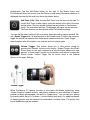
Main Control Bar: This contains the Pro button with shortcuts to your deviceʼs photo
albums, the appʼs Pro Studio modules, and the appʼs Settings. The new Photo/Video
Toggle switches between the photo, video, and QR Code cameras. The Main Shutter
button is in the center of the Control Bar. To the right of the Main Shutter button is the
Anti-Shake/Self Timer Shutter Release button. At the far right is the Pro Settings
menu, where you can turn off/on the onscreen composition guides, the onscreen Virtual
Horizon, and the photo compass. You can also easily turn on/off Expert Mode and SelfTimer Mode.
In Video Mode, the Pro Settings menu on the right lets you turn off/on the onscreen
composition guides, the onscreen Virtual Horizon, and the photo compass. You can turn
on/off Expert Mode and also easily switch between several video resolutions in case
you need smaller video files for faster uploading or to save disk space on your device.
ProCamera 3.5 includes:
•
•
Up to 1-hour video recording with iPhone 4 and 4S, iPad2, iPod (2 hours for
iPhone 3GS)
Full HD video recording for iPhone 4S
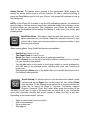
In QR Reader Mode, the semi-transparent heads-up display provides
easy access to the Torch controller. Align the QR between the brackets.
The camera will read the QR Code automatically. Once scanned, you can
automatically open the URL in Mobile Safari, copy it to the clipboard to
paste into other apps, share the code, or use of one of the contextsensitive options which are offered depending of the type of code (e.g. adding a vCard
to your address book, etc.).
Anti-Shake Mode: The Anti-Shake feature will delay the shutter release
until ProCamera is steady. This helps you to take clearer, sharper