1
USER MANUAL
BH08
2.2 Charger and batteries
The Bluetooth headset BH08 can be charged either by charger or by the USB port of computer. Please
notice that it is intended to use with the charger that is included in the package.
Charge the battery
This device has a built-in, rechargeable battery.
1. Connect the charger to a wall outlet or connect the headset to the USB port of computer. The red
indicator light is on during charging. If charging does not start, disconnect the charger, plug it again, and
retry. Charging the battery fully may take up to 2 hours.
2. When the battery is fully charged, the red indicator light will turn off. Disconnect the charger from the
wall outlet and the headset or disconnect the headset from USB charging cable.
The fully charged battery has power for up to 4.5 hours of talking time or up to 70 hours of standby time.
However, the talking and standby times may vary when used with different mobile phones, usage settings,
usage styles, and environments.
When the battery is running out of power, the red indicator light starts to flash.
2.3 Switch the headset on or off
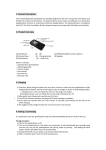
To switch on, press and hold the MFB for 3 seconds. The blue indicator light starts to flash.
To switch off, press and hold the MFB for 4 seconds until the red indicator light flashes.
2.4
1.
2.
3.
Pair the headset with a compatible phone
make sure your headset is turn off
press and hold the MFB for 8 second until the blue and red light flashes alternately
Activate the Bluetooth feature on the phone, and set the phone to search for Bluetooth devices. See the
user guide of your phone for instructions.
4. Select the headset (BH08) from the list of found devices.
5. Enter the pass code 0000 to pair and connect the headset to your phone. For some phones you may
need to make the connection separately after pairing. See the user guide of your phone for details. You
only need to pair the headset with your phone once.
6. If the pairing is successful, the headset’s blue light will flash 3 times briefly for the first time follow by a
single flash every 7 seconds. The headset’s name appears in the phone menu where you can view the
currently paired Bluetooth devices.
2.5 Disconnect the headset from the phone
To disconnect the headset from your phone (for example, to connect the phone to another Bluetooth device),
do one of the following:
·Switch off the headset.
·Disconnect the headset in the Bluetooth menu of your phone.
·Move the headset more than 10 meters(30 feet) away from the phone.
You do not need to delete the pairing with the headset to disconnect it.