1
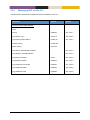
7.3.17
Enable/disable Port Monitoring .................................................................................................. 97
7.3.18
Set Mirror Port ............................................................................................................................ 97
7.3.19
Set Monitored Ports .................................................................................................................... 97
7.3.20
Show Port Monitoring Settings ................................................................................................... 98
7.3.21
Show Monitor Destination Port .................................................................................................. 98
7.3.22
Show Monitor Source Ports......................................................................................................... 98
7.3.23
Manage LLDP settings ................................................................................................................ 98
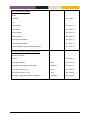
7.3.24
Enable/disable LLDP .................................................................................................................... 99
7.3.25
Show LLDP Status ...................................................................................................................... 100
7.3.26
Enable/disable Web Management Interface ............................................................................ 101
7.3.27
Enable/disable SSH Service ....................................................................................................... 101
7.3.28
Enable/disable Telnet Service ................................................................................................... 101
7.3.29
Show Web Management Interface Setting ............................................................................... 102
7.3.30
Show SSH Server Settings .......................................................................................................... 102
7.3.31
Show Telnet Server Settings ...................................................................................................... 102
7.3.32
Show System Environment Sensors ........................................................................................... 102
7.3.33
Show System Uptime ................................................................................................................ 103
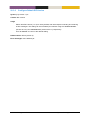
7.3.34
Show Memory Usage ................................................................................................................ 103
7.3.35
Show Running Processes ........................................................................................................... 103
7.3.36
Show Flash Partition Table........................................................................................................ 103
7.3.37
Update Flash Partition Table .................................................................................................... 104
MES-OS Management Guide
Table of Content • 5