1
Contents
Intended Use�������������������������������������� 4
Features���������������������������������������������� 4
Common Keyboard Shortcuts�������������� 4
Legal Notices�������������������������������������� 4
Launching the Application������������������ 5
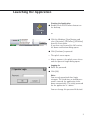
Starting the Application���������������������� 5
Logging-In������������������������������������������ 5
The Main Window ������������������������������ 6
Setting the Password �������������������������� 8
Logging Out���������������������������������������� 8
Opening the Help Window ������������������ 9
Customizing Settings��������������������������10
System Settings ����������������������������������10
Alarm Configuration����������������������������13
Editing Alarm Settings ������������������������14
Deleting Alarm Settings ����������������������15
Printing the Alarm Settings������������������15
Defining Statistics��������������������������������16
Setting Statistics Times������������������������17
Setting the Language��������������������������18
Registering Devices����������������������������19
Adding Devices������������������������������������19
Editing Devices������������������������������������21
Deleting Devices����������������������������������22
Retrieving Device Data������������������������23
Pinging Devices ����������������������������������24
Managing Product Types
(Checkweigher)����������������������������������25
Adding Product Types��������������������������25
Setting-up Parameters for each Weigh line������������������������������27
Editing Product Types�������������������������28
Copying Product Types������������������������29
Removing Product Types ��������������������31
Changing Tare and Density Values . . . . 32
Creating Batch Plans����������������������������33
Removing Batch Plans ������������������������34
Managing Product Types
(Metal Detector). . . . . . . . . . . . . . . . . 35
Adding Product Types. . . . . . . . . . . . . . 35
Editing Product Types. . . . . . . . . . . . . 36
Copying Product Types. . . . . . . . . . . . . 37
Removing Product Types . . . . . . . . . . . 37
Monitoring Production Batches����������38
The Monitoring Window����������������������38
Setting Limits��������������������������������������39
Setting Button Sizes����������������������������39
Viewing Graphs ����������������������������������40
Using Graphs��������������������������������������42
Viewing Violations������������������������������43
Viewing Statistics��������������������������������45
Viewing the Device Status��������������������45
Checkweigher Remoting����������������������45
The Message Pane ������������������������������46
Running Offline Batches����������������������47
Monitoring Events������������������������������49
Opening the Alarm List Window����������49
Using the Alarm List Window ��������������51
The Statistics Window������������������������53
Using the Statistics Selection Window��53
Using the Statistics Window����������������55
2