1
Dear
customer
Thank you for purchasing this product. Before connecting, operating or adjusting this
product, please read the instructions completely. Please keep this manual for future
reference.
Accessories
To order accessories, refer to “Accessory Purchases” on page 17.
Please check and identify the supplied accessories.
Use numbers when asking for replacement parts.
(Product numbers correct as of February 2006. These may be subject to
change.)
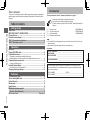
Table of contents
Table of contents/Accessories
Getting started
Accessories..................................................................................................2
IMPORTANT SAFETY INSTRUCTIONS.......................................................4
Product Service............................................................................................4
Discs that can be played..............................................................................5
STEP 1 Connection to a television.............................................................6
STEP 2 The remote control..........................................................................7
Operations
Basic play......................................................................................................8
Playing MP3/JPEG discs..............................................................................9
Convenient functions.................................................................................10
Displaying current playback condition/Quick replay/
Skipping about one minute forward/Zoom/Enjoying advanced surround.................. 10
Changing the play sequences...................................................................11
Changing the player settings....................................................................13
Reference
Troubleshooting guide...............................................................................15
Tips for making data discs........................................................................16
Limited Warranty........................................................................................17
Maintenance............................................................................................... 18
Specifications............................................................................................ 18
Specifications.............................................................................................22
Referencia rápida en español
(Spanish Quick Reference)....................................................................19
Main feature index...................................................................... Back cover
RQTC0074
1
1
1
2
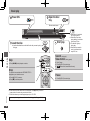
Remote control
AC power supply cord
Audio/video cable Remote control batteries
(N2QAYB000011)
(K2CB2CB00020)
(K2KA6BA00004)
Note
•
•
The included AC power supply cord is for use with this unit only. Do not use it with
other equipment.
Do not use an AC power supply cord from other equipment.
User memo:
DATE OF PURCHASE _________________________________________________
DEALER NAME ______________________________________________________
DEALER ADDRESS _ _________________________________________________
___________________________________________________________________
TELEPHONE NUMBER ________________________________________________
Program play/Random play....................................................................................... 11
Using On-Screen Menus............................................................................12
On-Screen Menu 1/On-Screen Menu 2.................................................................... 12
r
r
r
r
The model number and serial number of this product can be found on either the
back or the bottom of the unit. Please note them in the space provided below and
keep for future reference.
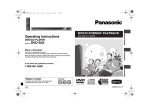
DVD-S1
MODEL NUMBER_____________________________________________________
SERIAL NUMBER_____________________________________________________