1
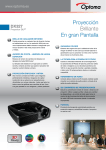
W317UST
OLD problems
Optoma SOLUTIONS
AFFORDABLE
cost
Electronic interactive whiteboard is needed for interactive teaching.
Interactivity built directly into the projector which can be installed virtually
anywhere there is a flat surface. Improved learning in the classroom with
up to 10 students able to interact at the board at the same time.
SHADOWS / GLARE
ULTRA SHORT THROW (USTi)
SECURITY
PEACE OF MIND
OUTDATED TECHNOLOGY
LATEST TECHNOLOGY
Shadows from the presenter or the audience appear on the screen. Light
projecting directly into the eyes of anyone stood close to the screen surface.
Projector positioned nearly 2m away to achieve a large screen size.
Projectors are vulnerable to vandalism and theft.
2D projection fails to deliver the information needed to ensure
it makes a real impact.
Projector is positioned very close to the screen to eliminate shadows
and stop light from shining in the presenter’s eyes. USTi projectors save
space and enable very large projection displays even in the smallest of
rooms.
Fully featured USTi projectors are fitted with a security bar, Kensington™
lock and password protection.
Engage and inspire your audience with the latest full 3D projection. Tried
and tested 3D technology proven to improve learning. 3D projection is
vital to creating the best classroom or meeting room environment.
NEXT GENERATION TOUCH INTERACTIVE
technology for mouse control, drawing
and writing
1
Easy to use with all your PC and Mac applications using only your finger
(or the passive pens provided)
•
•
•
•
•
•
2
Draw and annotate on the projected image
10 point multi-touch using only your finger*
3
Highly responsive with pinpoint accuracy right to the edge of
the screen
4
Ultra-lightweight passive pens are easier to hold
Two modes, pen and mouse
5
1. Mouse functions
Multi language support
2. Brush pens
Interactive Software
Enhance your teaching with the included LightPen interactive Software.
Teaching and editing tools are provided to give you everything you need
to interact and engage with your audience.
Diverse uses including presentations for business conferences, teaching
in education and training for business.
3. Highlighter pen
4. Drawing tools
6
7
5. Eraser brush
6. Dual pen control
7. Whiteboard mode
8
8. Additional tools including:
spotlight, curtain, print
*Mac device does not support multi-touch
ULTRA SHORT THROW LENS
Position the W317UST even closer to the wall so that the light beam doesn’t shine into your eyes. Project an impressive 60” diagonal image from just 45cm from
the screen. Stand alone or wall mounted the W317UST eliminates shadows on the screen and allows you to present with ease.
45cm
60”
Screen