1
BROADCAST TOOLS, INC.
MC-16 INSTALLATION AND OPERATION MANUAL
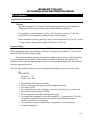
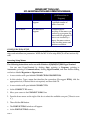
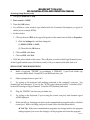
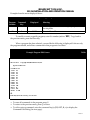
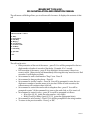
The edit macro cell dialog allows you to edit one cell of a macro. It displays the contents of that
cell
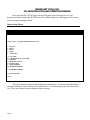
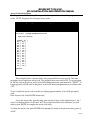
Example Edit Macro Cell Dialog
Table 12
Edit MacroCell 06 => 06-S11
D - Delay
E - End of Macro
B - Emit Beep
H - Hang Up
M - Invoke Macro
P - Set Phone Audio
R - Set Relay
S - Send String
Q - Quit Edit
Cmd?
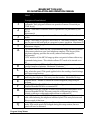
The cell can be set to:
• Delay execution of the rest of the macro – press D. You will be prompted for the two
digit number of tenths of seconds of that delay. Example: 10 = 1 second.
• End execution of the macro – press E. Note that this is not necessary if there is no
room to add it. Otherwise the cell immediately following this entry must be set to End
execution. It will display as blank.
• Set command to emit a confirmation “Beep” tone. Press B
• Set command to hang up the phone – Press H.
• Set command to invoke a macro – Press M. You will be prompted to enter the two
digit macro number of another macro to be invoked. When it ends execution, the
current macro will continue where it left off.
• Set command to control the send audio-to-telephone line – press P. You will be
prompted to enter Y if the command is to turn on the audio link, or N to turn it off.
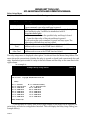
• Set command to control a relay – press R. You will be prompted as follows:
• Relay Num (01-16) (enter the relay number – two digits)
• Relay Close(C)or Relay Open(O) (C/O) (enter the appropriate letter)
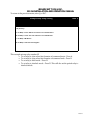
• Set command to send a string – Press S. You will be prompted for the string number.
• To return to the previous menu – Press Q or ESC.
PAGE 21