1
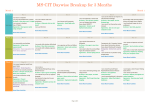
Week 4
Day 19
I can interact with people using
social media
Netiquettes : Stay safe on social
networking sites
Play games online
Go Green : When multitasking, close
the unused apps
Activities
Netiquettes : Protect yourself from
cyber bullying
Google Apps
Go Green : Use Google Calendar to
work effectively
Day 20
I can create a To-do list/Agenda/
Timetable/Address Book
Go Green : Think before you take a
printout
I can use rupees symbol in my
spreadsheet table
Ergonomics : Ergonomic keyboard
drawer
Day 21
Day 22
Day 23
Day 24
I can backup and recover my files
and folders
Creating Event Expenses/Exam
Record/Budget/Loan Calculator
Go Green : Organize files and
folders: Saves energy
Ergonomics : Rule of 20-20-20”
I can create
Timesheet/Reports/Question
bank/Student Database
Go Green : Avoid unnecessary digital
storage and email attachments
Ergonomics : Use ergonomic table
I can configure Microsoft Outlook
I can send newsletter as an
attachment
Go Green : Delete unused files from
the hard drive
I can include Signature in my
outgoing mails
Ergonomics : Blink your eyes
I can manage my
Appointments/Meeting
Minutes/Checklist/Donors Database
Know More Activities
Know More Activities
Know More Activities
Know More Activities
Know More Activities
Know More Activities
Month 2
Month 2
Week 5
Day 25
I can use Outlook to manage my
email communications
I can use Outlook to create an
Address Book
I can use Outlook to organize my
Mailbox
Go Green : Archive large email
folders
Activities
I can schedule meets using Outlook's
Planner
I can use Outlook Calendar to
schedule Appointments
Ergonomics : Soothe your eyes
Netiquettes : What's phishing?
Day 26
Day 27
Day 28
I can create Company
Profile/Training
I can use Outlook to track the
Presentation/Business Presentation
progress of items in my Task List
I can create a Products and Service
I can create a Greeting
Catalogue
Card/Certificate/Wedding Card/Gift
Go Green : Screensavers are not
Voucher
energy savers, shun them
Go Green : Use energy saving
I can convert and edit image files
technology
Ergonomics : Proper lighting around
Ergonomics : Soothe your eyes
computer workstation
I can create digital photo album
Know More Activities
Know More Activities
I can create Digital Photo
Album/Slambook/Portfolio/Family
Tree
Go Green : Buy computers that
come with a Star rating
I can record voice by using Sound
Recorder
I can share photo album on
SlideShare/Picasa
Ergonomics : Avoid eating at your
desk
Netiquettes : Sharing photos online
Know More Activities
Know More Activities
Page 2 of 4
Day 29
Day 30
I can use Stellarium to view realistic
sky in 3D
I can create a
Go Green : Use soft copies of
Schedule/Stickers/Magazine
textbooks whenever possible
cover/Poster
I can open a net banking account
Go Green : Reduce paper margins to
I can book tickets online
decrease paper consumption
Go Green : Use digital copies over
I can record my presentations using
hard copies
CamStudio
Ergonomics : Some neck exercises
Ergonomics : Exercises for your back
Netiquettes : Encrypt files to protect
data
Know More Activities
Know More Activities