1
Table of Contents
INTRODUCTION ....................................................................................................1
How to Use This Guide............................................................................................... 1
Conventions of This Guide ......................................................................................... 1
A Note about Icons ..................................................................................................... 2
Safety Precautions...................................................................................................... 2
System Requirements ................................................................................................ 2
Box Contents .............................................................................................................. 3
The Scanner’s Features ............................................................................................. 3
Product Information .................................................................................................... 4
CHAPTER I. INSTALLING THE SCANNER....................................................................5
Software Installation Requirements ............................................................................ 5
Hardware Requirements ............................................................................................. 5
Installing and Setting up the Scanner ......................................................................... 5
Step 1. Connecting the Scanner to Your Computer ............................................................. 6
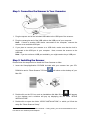
Step 2. Installing the Scanner............................................................................................... 6
Step 3. Testing the Scanner ................................................................................................. 8
Software Setup Troubleshooting ................................................................................ 9
CHAPTER II. USAGE AND MAINTENANCE ............................................................... 10
Operating the Scanner.............................................................................................. 10
Placing Photos with the Protective Sheet ................................................................. 10
DigiPhoto .................................................................................................................. 11
Function Features..................................................................................................... 12
Using the Scanner Button......................................................................................... 13
Status Indicator......................................................................................................... 14
Scanner Connection ................................................................................................. 14
Maintenance ............................................................................................................. 15
Calibrating the Scanner ...................................................................................................... 15
Cleaning the Scanner ......................................................................................................... 15
Usage & Maintenance Tips....................................................................................... 16
APPENDIX A: TROUBLESHOOTING ........................................................................ 17
Scanning Problems................................................................................................... 17
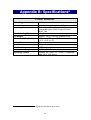
APPENDIX B: SPECIFICATIONS ............................................................................ 20
APPENDIX C: CUSTOMER SERVICE AND WARRANTY ............................................... 21
Statement of Limited Warranty ................................................................................. 21
FCC Radio Frequency Statement............................................................................. 22
CONTACTING PLUSTEK ....................................................................................... 24