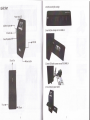
1
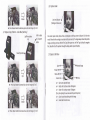
lnstoll the Roll Film into holder:
1. Take out
the roll film holder from package
2. lnsert roll film into film slot
Figure 2
3. Pull out the roll film in another side
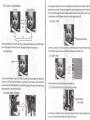
Down/Flip button
(Flip hard key)
Press hord key on top of device in live view
Figure 3
o avoid mirror image, follow the serial numbers (from left to right) on top of film when inst
egative film into holder
r)
Down
Figure 7
the image can be corrected by Flip function in hard key
evice before capture, or enter playback edlt menu after capture [see fig.3 and fig.4].
'the image
is upside down [see fig.2],