1
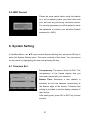
5.5 HDD Format
Please be extra careful when using this feature
as it will completely erase your hard drive and
your will lose any previously recorded content.
For security purposes you will be asked to enter
the password to confirm your decision.(Default
password is :0000).
6. System Setting
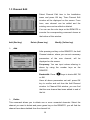
In the Main Menu, use ▲▼ keys to select System Setting item, and press OK key to
enter into System Setting menu. This menu consists of five items. You can access
its sub-menu by highlighting this item and pressing OK key.
6.1 Common Set
Transparency: The value is from 0 to 30%. The
transparency of the closed caption that you
have seen varies with your selection.
Banner Time: Whenever a new channel is
selected, an Info bar appears momentarily at
the bottom edge of the screen. Therefore this
setting is provided to set the display duration of
the Info bar.
After setting well, press OK or EXIT key to save
and exit.
27