1
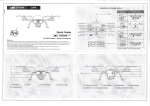
Rear ba“ ery plate instruction:
A: Ba廿
θ
eIγ plate丨 ocking
M3× 50mm
sIze∶
B∶
screW ho|e,4h° 丨
es, Copper scre、 ″
75x75mm VEsA, screW size∶ M4× 5omm
1
2
4
6
3
1.3TF Card sIot:
5
1、
VIDEo ouT∶
2、
HDMl:HD HDM丨
C° mposⅡ e video signaI output
3、
VIDEO tN:Composite Video signa"nput
4、
UsB data ungrade po汁
5、
AVD∶ 0IN∶
6、
PoWer nputjack
7
Audio signalinput
PoWer sˇ vitch“
ˉ—C。 一 艹
~” lndicates
thatthe poweris
Disc° nnectthe p° wer
turned“ 0” means
Ba枝 ery Pack
8、
Antenna
9、
10
signaI input
11∶ itis a soreW ho|e for ba廿 ery plate, when you use
ba廿ery eXterna|,10is“
sIze∶
M3×
+”
, 11is“ ˉ
∴Copper
screw
95mm
2,2Recording sta仗
2,DVR(Vide° )0perati° n instruction:
Whenthe mon"ors・ γIDEo刂 N"and"AVDIoˉ lN"has ac∞ ss
to
:
The mon"orinput signa卜 se edionˉ iDVR"(vide° signal)channel,
the appropriate signals° r"RF"Wireless receiver transmltter has
the monitor screen wⅡ 丨
disp丨 ay the“ RF” channe|ofthe screen1
been re"ab|y received video signaltransn1i廿 ed oVer and cheCk the
press the"REC/oK"bu‖ on
TF card has been re"ably into the s丨
ot(mon"°
rˇ
呐thoutthe HDMI
w‖ appear when the red】 ashingO,
meaning that sta"recording begins,the D、
input there is no video function)
tto RF channe丨
`R defau丨
Anerthe device is turned on,press“
soVRCE丿 EXIT"to
・
DVR・ channel press“ REC`0K"∴ henthe mon1or wⅡ
select
I be on“ RF”
channel r you w° uld Ⅱ
ke to“ VIDEo” ,press“ s0URCE`EXIT"again
fyou w° u|d Ⅱ
ke
to“
V|DEO” channel,press“ souRCE/EX丨 T”
t°
sWitCh(HDMhnput w1hout rec° rding fundon)fy° u wantto stop
the rec° Γ
ding
and press"REC/oκ "button Recording°
r recording
to change to VlDEo
by tirne period paragraphs packaged storage
21DVR(Vide° )butt° n
instruction:
23 Video pIayback:
、
^/hen the video for some time1you need to playback video
efects observed,press"mODE"bu△ on乩 the top eft appear逦
彐
,
because the video store is paokaged stored by tirne period,can use
4
5
1 sC,sH0T∶
2 REC`0K∶
3
Rea丨
3
ⅡUP`D0WN"keysto go f°
mard or backward t°
2
+imeimages snapping
the device begins t°
,DoVˇ
’
Recording sta",stop/funct∶ °n con】 rm
MODE∶ Mode button to enter/ex"the playback rnode
4 MENV∶
Menu key to enter/eX沈
se{ect playbaCk
币le package,se丨 ect and press the’ tREC`(冫 KⅡ button to confirm,
the DVR(Vide°
)menu
N’
enterthe playback rnode P丨 ayback with the
・
button to seIectthe playback speed,return fast pIay with
"uP99key in orderto eXit When fa$tp丨
ayback is muted trumpet,
playing at normal rate for a Voice broadcast
mode
UP:
UP bu求 on,up an opu° n
DOWN: DoWn button,down one opuon
24screen shot(sC,sH0T funct∶ o")
Under V|DE⊙ or RF,Press the“ sC.sHOT” ,then Can be store the
rea"imeimages(make sure TF cardinsed)‘
r wantt° revleW these
,