1
2.2
Using D-Bug12 Commands
D-Bug12, the EVB’s firmware-resident monitor program, provides a self-contained operating environment that
allows writing, evaluation, and debugging of user programs.
Commands are typed on the terminal’s D-Bug12 prompt line and executed when the carriage return (ENTER) key is pressed. D-Bug12 then displays either the appropriate response to the command or an error
indication.
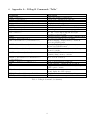
The D-Bug12 command-line prompt is the greater sign (>). Table 1 in Appendix A summarizes the D-Bug12
commands. In the following section we will just look at a few of these commands 2 . Please check:
1. The tutorial on the “MiniIDE” in Lab0 Section on the web for more information on how to utilize the
D-Bug12 commands.
2. Your text book Section 3.6 on page 84 for using the D-Bug12 commands.
2.2.1
LOAD “Load S-Record File”
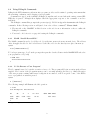
The LOAD command is used to load S-Record object files into memory from an external device. The address
offset, if supplied is added to the load address of each S-Record before its data bytes are placed in memory.
syntax
Load [<AddressOffset>]
To load a program, type “load” at the prompt, then press the download button in the MiniIDE GUI and select
your program s-record (*.s19)
> LOAD 1000
**********************
>
2.2.2
G “Go Execute a User Program”
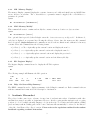
The G command is used to begin the execution of user code. The program will begin execution at the address
supplied. The location of the program in memory can be set using assembler directive (e.g. ORG). Execution
of the user program continues until a user breakpoint is encountered, a CPU exception occurs, or the EVB’s
reset or program-abort switch is pressed.
syntax
G
[<Address>]
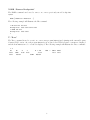
The following example will illustrate the GO operation.
> G 800
User Breakpoint
PC
0820
0820
>
2
SP
0A00
08
Encountered
X
057C
Y
0000
INX
D = A:B
00:00
CCR= SXHI NZVC
1001 0000
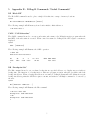
Appendix B gives some more examples
2