1
3
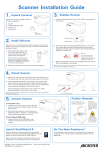
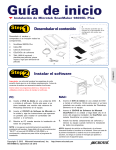
Feed Tray
Install Digitizer
Feed Tray Holes
Install Feed Tray
A. Look for two sets of the Feed Tray Holes
at both ends of the front-top of the
digitizer.
B. Insert and push down both sides of the
Feed Tray into its compartment holes,
making sure the Feed Tray snaps into
place.
Install Output Tracy
A. Look for two sets of Output Tray Holes at both ends of the front-bottom of the digitizer.
B. Hang the extension part onto the compartment holes of the Output Tray, making sure the
extension part snaps into place.
C. Insert and push down both sides of the main part of the Output Tray into its compartment
holes, making sure the Output Tray snaps into place.
Output Tray Holes
Output Tray
(Extension part)
Output Tray (Main part)
Output Tray
(whole unit)
2