1
AP5BCF45-2 Manual
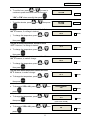
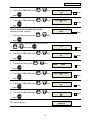
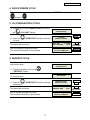
The operator can now end this cycle by pressing the
("START/ STOP") button.
The display will now show:
OPERATING MODE
CHOOSE CYCLE
2. MANUAL MODE - SOFT CHILL
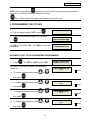
IF INSTEAD OF AUTOMATIC you wish to select a MANUAL cycle, perform steps 1.a, 1.b, 1.c
instead of button
. The LED for
and 1.d (above), except in step 1.c press button
"MANUAL" will then be steady "ON". The four readouts in those steps will be the same as before.
Cycle time can be changed only in Cycle Programming mode. To change the programmed cycle
time for any cycle see the instructions on Pages 13 to 19.
e. Press the
("START/STOP") button to start the cycle.
03.07.2006
10:41 AM
REMAINING TIME
01:29
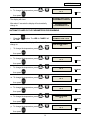
The display show will:
alternating with
AIR
F / CHICKEN
72°F
140°F
01:29
Will count
down
The MANUAL mode uses time and the air probe temperature to control the cycle.
The default total time for a soft cycle is 90 minutes. After the 90 minutes the unit will automatically
go into holding mode.
03.07.2006
12:11 PM
REMAINING TIME
00:00
The display show will:
alternating with
AIR
F / CHICKEN
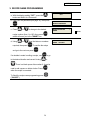
The operator can now end this cycle by pressing
00:00
Blinks
34°F
40°F
("START/ STOP").
OPERATING MODE
CHOOSE CYCLE
The display will now show:
3. HARD CHILL CYCLE
To perform a hard chill cycle, follow steps 1 or 2 (above), EXCEPT in step 1.b (above) press
instead of
.
22