1
Rayzoon Jamstix 2
User Manual
Table Of Contents
1
2
3
4
5
6
What is Jamstix? ....................................................................................................5
What’s New? .........................................................................................................5
Specifications ........................................................................................................6
Requirements ........................................................................................................6
Compatibility .........................................................................................................6
Workflow ..............................................................................................................7
6.1
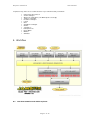
How does Jamstix work within my host? ............................................................7
6.2
The “Song -> Part -> Bar” Concept...................................................................8
6.3
Automatic Vs. Manual Composition ...................................................................8
6.4
Jam Interaction ..............................................................................................8
7
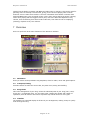
Overview ..............................................................................................................9
7.1
Main Menu .....................................................................................................9
7.2
Transport/Timing............................................................................................9
7.3
Song Sheet ....................................................................................................9
7.4
Timeline ........................................................................................................9
7.5
Brain Controls .............................................................................................. 10
7.6
Bar Editor .................................................................................................... 10
8
Quickstart ........................................................................................................... 10
9
Drum Kit............................................................................................................. 12
9.1
Virtual Kit Display ......................................................................................... 12
9.1.1 Kit Menu .................................................................................................. 13
9.2
Loading & Saving Kits ................................................................................... 14
9.3
Installing Paks (Stock Kit & Expansions) .......................................................... 14
9.4
Editing The Kit ............................................................................................. 15
9.5
Configuring a VSTi sound module ................................................................... 17
9.6
MIDI Output Usage ....................................................................................... 17
10 Mixer.................................................................................................................. 18
10.1
MIDI Remote Control .................................................................................... 19
11 The Jamstix Interface – In Depth ........................................................................... 20
11.1
Transport & Timing ....................................................................................... 20
11.1.1
Drum Module Mode ............................................................................... 20
11.1.2
Jam – No Input ..................................................................................... 21
11.1.3
Jam With Audio..................................................................................... 21
11.1.4
Jam With MIDI Input ............................................................................. 21
11.1.5
The Timing Slider .................................................................................. 21
11.1.6
Minimum Power .................................................................................... 21
11.1.7
Shuffle................................................................................................. 22
11.1.8
Transport Controls................................................................................. 22
11.1.9
Power Level.......................................................................................... 22
11.1.10 Activity LEDs ........................................................................................ 22
11.1.11 Freezing............................................................................................... 22
11.2
The Song Sheet............................................................................................ 23
11.2.1
Song Menu ........................................................................................... 24
11.2.2
Part Menu ............................................................................................ 25
11.2.3
Bar Timeline ......................................................................................... 26
11.3
The Brain..................................................................................................... 27
11.3.1
Brain Controls....................................................................................... 29
11.3.1.1
Feel Processor ............................................................................... 29
11.3.1.2
Redirection ................................................................................... 29
11.3.1.3
Power Hand .................................................................................. 29
11.3.1.4
Auto Snare.................................................................................... 30
11.3.1.5
Reduction ..................................................................................... 30
11.3.1.6
Snare Ghosts ................................................................................ 30
11.3.1.7
Tom Groove .................................................................................. 30
11.3.1.8
Groove Importer............................................................................ 31
11.3.1.9
BIAS Sliders .................................................................................. 31
Page 3 of 51