1
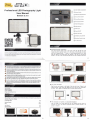
6. Under the flash mode, open the 6roup B sync and light up the light indicator to
provide the flash signal. The LED lights which have set as Group B sync will flash
To close Group B, press the Group B sync switch, the light indicator will turn off.
rI
7. Under the flash mode, open the Group C sync and tight up the light indicator to
provide the flash signal. The LED lights whlch have set as Group c sync will flash
To close Group c, press the Group C sync switch, the light indicator will turn off.
rI
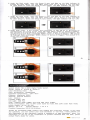
8.Under flash mode, if the receiver and transmitter of ABc,AB,Ac or Bcturned on
simultaneously any group of the same will flash.When shown in PictureOtriggers,
the pictures@@Ol@will flash accordingly. When shown in pictureOtriggers, the
pictures@@@will flash accordingly.When shown in PictureG)triggers, the picture
@ @ @ will flash accordingly. When shown in picture @ triggers, the picture @ @
@
will flash accordingly.
o
@
::
@
@
+e
9
a
o
@
Svstem Mode: FSK 2.4GHz Digital Radio System
Group: Group A, Group 8. Group
Color Rendering lndex : )85
C
Color Temperature: 5500Kt200K
Operation Temperature: 20C-50'C
Distance: Maximum 100M
Antenna: lnternal Antenna
LUx:20001m
lrradiate Angle: 60'
LED Lisht: 308 PCS
Flash: Support SYNC Trigger and King PRo Flash Trigger.
Power Consumption: Max 16.8W under stand by mode.Max 25W under flash mode.
Power Supply: AC DC 9V 14V
Battery: AA X
8
Lithium Battery: 7.2V X
2
Product Dimension: 225 X 150 x 48mm
PTXEL product and reading this instruction manual. ,f you have
any questions, you can contact your local distributor or visit http://www. pixelhk. com
Thank for purchasing
This information of this instruction manual is updated as of 18th November, 2013. For
information on the use of the combination of product marketed after this date, please
contact Pixel's dealer for advice.
Pr*!-,
reMr1s
ro
01
10