1
Chapter 7
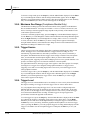
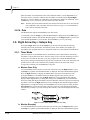
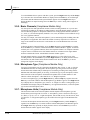
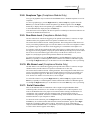
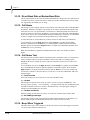
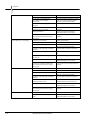
Check Channel(s): Tran Message.
Check Channel(s): Vert Message.
Check Channel(s): Long Message.
Check Microphone Message.
7–2
Transducer not connected.
Connect the transducer.
The transducer not installed level.
Check the transducer installation for level.
The transducer moved during
Sensorcheck.
Press the Test key to run Sensorcheck
again. Do not touch the transducer.
Transducer cable improperly installed or
damaged.
Check the cable connections and cables.
Wall Installation – transverse and vertical
geophones were not switched.
Switch the transverse and vertical
geophones.
Damaged transducer.
Have the transducer checked by an
authorized Instantel service facility.
Operating in Compliance Mode with a
Series III sensor that does not support
Sensorcheck.
In the monitor setups, set Sensorcheck to
Disabled.
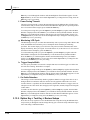
Transducer not connected.
Connect the transducer.
Transducer not installed level.
Check the transducer installation for level.
Transducer moved during Sensorcheck.
Press the Test key to run Sensorcheck
again. Do not touch the transducer.
Transducer cable improperly installed or
damaged.
Check the cable connections and cables.
Transducer installed upside down.
Check the transducer for the arrow on the
top.
Ceiling Installation – Vertical geophone
not inverted.
Invert the vertical geophone.
Damaged transducer.
Have the transducer checked by an
authorized Instantel service facility.
Operating in Compliance Mode with a
Series III sensor that does not support
Sensorcheck.
In the monitor setups, set Sensorcheck to
Disabled.
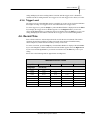
Transducer not connected.
Connect the transducer.
Transducer not installed level.
Check the transducer installation for level.
Transducer moved during Sensorcheck.
Press the Test key to run Sensorcheck
again. Do not touch the transducer.
Transducer cable improperly installed or
damaged.
Check the cable connections and cables.
For wall installations, the arrow was not
pointed towards the event.
Point the arrow located on the top of the
standard transducer towards the event.
Damaged transducer.
Have the transducer checked by an
authorized Instantel service facility.
Operating in Compliance Mode with a
Series III sensor that does not support
Sensorcheck.
In the monitor setups, set Sensorcheck to
Disabled.
Microphone not connected.
Connect the microphone.
Damaged microphone or microphone
cable.
Have the microphone checked by an
authorized Instantel service facility.
Minimate Plus Operator Manual