1
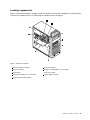
Locating internal drives
Internal drives are devices that your computer uses to read and store data. You can add drives to your
computer to increase storage capacity and enable your computer to read other types of media. Internal
drives are installed in bays. In this manual, the bays are referred to as bay 1, bay 2, and so on.
When installing or replacing an internal drive, it is important to note the type and size of the drive that you
can install or replace in each bay and correctly connect the cables to the drive installed. Refer to the
appropriate section in “Installing or replacing hardware” on page 21 for instructions on how to install or
replace internal drives for your computer.
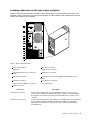
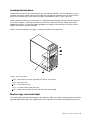
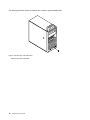
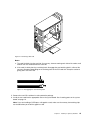
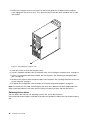
Figure 5 “Drive bay locations” on page 11 shows the locations of the drive bays.
Figure 5. Drive bay locations
1 Bay 1 - Optical drive bay (with an optical drive installed on some models)
2 Bay 2 - Optical drive bay
3 Bay 3 - Card reader drive bay
4 Bay 4 - Secondary SATA hard disk drive bay
5 Bay 5 - Primary SATA hard disk drive bay (with a hard disk drive installed)
Machine type and model label
The machine type and model label identifies your computer. When you contact Lenovo for help, the machine
type and model information helps support technicians to identify your computer and provide faster service.
Chapter 1. Product overview
11