1
Be sure that the connected devices don't exceed the 6A per channel power capability. Overloads may
damage the unit. Check the maximum input current of the lighting devices before connect them to the
interface and turn the power on.
This control unit uses the constant voltage driving technique, so its working voltage is the same supplied to
the load. For this reason it is necessary to accurate choose the supply voltage accordingly the connected
devices: for example, if the RGB devices work with DC 12V, you have to supply the interface with a DC 12V
power supply unit, while if the RGB devices work with DC 24V, you have to supply the interface with a DC
24V power supply unit.
It is recommended that the power supply unit is supplied separately so that it may be individually switched on
and off.
Position then the interface in a safe place. Always ensure that the structure and the fixing materials (screws,
hooks, etc.) are secure and able to support the weight of each unit.
Don't install this interface in places that may be easily reached by people who ignore this instruction manual
for use and safety.
OPERATING INSTRUCTIONS
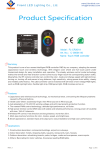
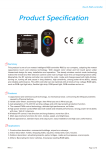
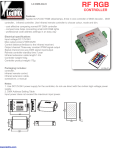
The control unit offers by default 16 colour combinations. The 8 selection buttons on the top side of the body
have a touch sensitive interface, resulting in an easier scene handling. Don't press the buttons strongly.
The 8 buttons are labelled in this way:
“POWER” – “PAUSE” – “MODE +” – “MODE -” – “SPEED +” – “SPEED -” – “BRT +” – “BRT -”.
In the following table you can find the meaning of the buttons of both LED interface and remote controller.
IMAGE
BUTTON
DESCRIPTION
POWER
Turns on and off the controller. When the controller is turned on it
plays the last scene that was running.
PAUSE
Pressing this button stops the execution of the currently selected
scene. Press this button again to continue the execution.
MODE +
Each touch on this button advances to the next automatic scene.
MODE -
Each touch on this button advances to the previous automatic scene.
SPEED +
Adjusts the speed of the current scene, each touch increases the
level.
SPEED -
Adjusts the speed of the current scene, each touch decreases the
level.
BRT +
Adjusts the light intensity, each touch increases the level.
BRT -
Adjusts the light intensity, each touch decreases the level.
OPERATING MODES
The interface provides 16 internal colour changes modes, that is you can automatically run the scenes
stored in the internal memory of the unit. During the fixed colour modes it is possible to adjust the light
intensity. The “pause” function during the execution of colour changing modes or during colour fades allows
to stop the RGB outputs on a fixed combination; moreover the execution speed of dynamic scenes is
adjustable. In the following table you can find the automatic colour changes functions.
3/8