1
5. GENERAL DESCRIPTION.
4. CONTROLLER HANDLING.
5.1. ADJUSTMENT.
4.1. TEMPERATURE SETTING.
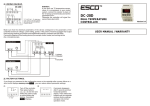
Controller is used to maintain T temperature with desired hysteresis T in cooling or heating
devices. Actuator control is in progress by the relay output and the temperature measurement is
made by the temperature sensor.
The principle of operation of the temperature control when cooling and heating:
Temp.
COOLING
Temp.
M
°C
set
HEATING
Press set button
for 2 seconds
Diode
Using:
°C
lights up.
M
or
set the desired
temperature.
set
91°C
6°C
T=1°C
T=5°C
T=1°C
4°C
T=1°C
T=90°C
T=1°C
Time
Output
M
°C
89°C
Time
set
Output
1
1
0
Time
0
Time
5.2. TEMPERATURE ALARM.
You can set upper and lower alarm threshold in controller parameters (F15 and F16
parameters), after exceeding which the high or low temperature alarm turns on.
Confirm the set with set
Button.
Diode
goes off.
Remarks:
– press M button in any time to cancel the setting
– the setting change can be limited by F13 and F14 parameters
Information:
To improve quick increasing or decreasing the settings values hold the
constantly for at least 1 sec.
or
button
Temp.
F15= 30°C
F16= -10°C
4.2. TEMPERATURE SETTING, when the SMART function is active (parameter F84=1)
High temperature alarm
Smart function allows for rapid temperature change with no need of pushing the SET button.
It is a very useful function for users, who often change temperatures.
Low temperature alarm
Time
Alarm
Switching delay F17= 0.1min
°C
1
0
Set the temperature by
or
pointer in any time. Diode
after 2 sec., and the controller saves the new setting.
goes off
Time
set
The alarm is turned on after the delay time (F17 parameter). Recommended time setting is 15
minutes, so that the alarm does not turn on too often in case of rapid temperature jumps.
The delay can be reduced to the minimum, i.e. 6 seconds (0,1min.), if the temperature does not
change abruptly. The alarm is signalled by internal buzzer or commands on the display:
- high temperature alarm
- low temperature alarm
Buzzer can be muted by pushing any button lub turned off permanently in F83 parameter.
M
Remarks:
–press M in any time to cancel the setting
–the setting change can be limited by F13 and F14 parameters
Information:
To improve quick increasing or decreasing settings values hold
at least 1 sec.
or
button constantly for
5.3. DIGITAL INPUT.
Controller has digital input D1 for emergency states signalling, for example system failure,
pressure control or safety thermostat activation, etc. Input type (normally opened, normally closed)
is programmed by F50 parameter. After input activation, the controller turns off the outputs, turns
on the beeper and the display indicates AL.d1. code. Emergency state sound signalling can be
maintained, until the alarm reset by using the buttons (F50=2 or 4).
5
3