1
Introduction to GenBroker Communications
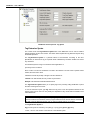
<accpath> is an optional access path string. This can be used (according to the OPC Specification)
to give the server a "hint“ how to get the OPC item specified by its <itemid>.
<prop> is a property ID as defined in the OPC 2.0 Specification. When specified, GenBroker uses
the server’s function IOPCItemProperties::LookupItemIDs() to get the property value. Note that not
all OPC 2.0 compliant servers support this function, so the usage is limited. Besides specifying the
property ID, it is possible to specify a property name listed below.
<idx> is an index or indexes (separated by commas) for an array. If the specified OPC item is of an
array type, this allows for accessing one of its elements. The element is read-only. The indexes
should be enclosed in brackets ([ and ]) and separated by commas (,).
<attr> specifies an attribute that should be returned instead of the item value. In OPC, values
always come with a quality value and timestamp. The attributes defined here are derived from these
values. The supported are attributes listed below. Unlike properties (see <prop> above), this option
works with any OPC server, even OPC 1.0. The attributes are read-only.
<rate> specifies a scan rate for the given item. Usually the scan rate is defined for a group of items,
e.g. in GraphWorX it is defined for the whole display. This option can override the display scan rate
for one particular item. The scan rate is in milliseconds.
Requested Type Separator
Each tag has its native data type, known as the canonical data type. OPC servers return values of
this canonical data type, if the client does not explicitly request another type. Some applications (e.g.
GraphWorX) allow for specifying the requested data type. Other applications may use this feature,
and make the requested data type part of the tag name (using the extended tag syntax). The
requested data type may be added on the very end of the tag name and separated by the separator
specified here.
Example: tag:Smar.Simulator\SimulatePLC.Sine|R4
Options in the tag name can be combined, but they must be used in the order indicated above.
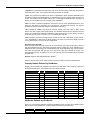
Property Names Defined by GenBroker
Property names supported by GenBroker are listed in the table below. Their meaning is defined in
the OPC Specification 2.0. The property names are equal to their IDs.
A
t
t
r
i
b
u
t
e
s
PROPERTY NAME
ID
PROPERTY NAME
ID
PROPERTY NAME
ID
DataType
Value
Quality
Timestamp
AccessRights
ScanRate
EUUnits
Description
HighEU
LowEU
HighIR
LowIR
CloseLabel
1
2
3
4
5
6
100
101
102
103
104
105
106
OpenLabel
TimeZone
DefDisplay
FgColor
BkColor
Blink
BMPFile
SoundFile
HTMLFile
AVIFile
CondStatus
AlQuickHelp
AlAreaList
107
108
200
201
202
203
204
205
206
207
300
301
302
AlPrimArea
CondLogic
LimExceeded
Deadband
HiHiLimit
HiLimit
LoLimit
LoLoLimit
ROCLimit
DevLimit
ItemID
Name
UsageCnt
303
304
305
306
307
308
309
310
311
312
5000
5001
5002
D
Attributes Defined by GenBroker
When any of the following attributes is defined, GenBroker returns the value of the attribute rather
than the value of the specified item. Possible attributes are listed in the table below.
ATTRIBUTE
DATA TYPE
quality
INTEGER
MEANING
Quality of the item – see OPC Specification for more details.
21