1
jL
G4flt
To ep*rrr the rcsr u*+l'iiF*td1i&{fiet*,*i,fuiirffit)#E
drixiiisl;itiilffitgl.{*ff ,Btlisi.
1.
a
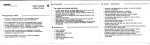
Product description
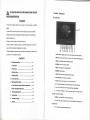
Front view
CAUTION
l. Plese
use the adapter attached
itr the acc€ssory if necessary, pleae use qualified
adapts.
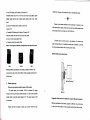
2, Plqse do NOT expose this product to dircct sulight, heat, or hwid conditions3, Please
kep awoy from stong light *'hite using this product to ensre tbe image
efect and long-tem
w.
4. Plese avoid heary impact oi drop onto the
5. Ple6e do NOT
clean
$ft
us chmical
cloth to maintain the bdghtness ofthe surfrce.
6. Without adjustable component in the
by
grcud.
rclutions to clem this product. Please wipe with a
yowlf,
to avoid
dmge
wit, ple@
do not take apffi or repair the
eit
1.
the prcducr.
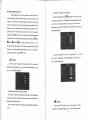
Pows lndicator Light Lighl turns
red when siandby, green whon working
2. BlWr Switch on/ofi Check Field (R6d, Greon.
Blue. Mon@hrmatic and Cotor)
3.
HDill: High definition signal input slection buflon
4.
CA|IERA: Canon
5. YPbpr:
6.
SD
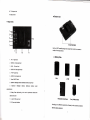
IlCamera Mode
ypbpr signal input setec{ion
button
iIARKER: Screen Marker
7. VIOEO: Composite video signal input
selection button
8. COLOR
1
.
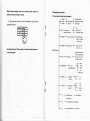
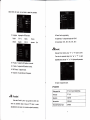
Menu operating
TEMp Color tffipeEture sebction
9,
4;rr6i9t Us
0_
> j Functis @nfirmation or value up while using menu
setting func{ions
11. Focus: Ctick
11
to switch betw@n 4:3 and .16:9 aspect
ratio
to switch ON/ OFF peaking Fitter(FocusAssist)Mode
12. {1 5g6ct;6. @nfimation or value doM while
using menu setting fuhctions,
and Switch ory'ofi Center Markor
13.
lrENU,
14.
l:
To activate OSD
(on-sc.en di6ptay) menu
Meou item value up adjustment button. No
Menu State to cycle adjust the s
level brightnes
15. V: Menu item value down adjustment
bution