1
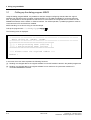
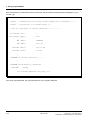
3 Utility program MSVR 3.1 Calling-up the dialog program MSVR Using the dialog program MSVR, it is possible to read-out changed configuring data and also the original software from the MS memory modules, online and offline, on any IBM-compatible PC, and store these as files. A prerequisite for online operation is that the PC is connected to the configured service interface of the SIMADYN D subrack via the COM1- or COM 2 interface. For offline operation, a parallel programmer must be connected to this PC and the driver installed. MSVR handling is now shown using an actual example. Call-up the program with c:\simadyn\pgm>mspp The following menu is displayed: *************************************************************** Basic dialog Vx <DATE> <TIME> *************************************************************** ========================================= [1] = Pre-processing RCOP (offline) [2] = Pre-processing RCOP (online) ========================================= !!!! Please enter the required number !!!! Number : In this case, the menu items represent the following functions: [1] : Reading-out changed data or the original software from an MS module inserted in the parallel programmer [2] : Reading-out changed data or the original software from a maximum of 8 processor modules of a connected SIMADYN D subrack. 3-2 Edition 05.95 Siemens AG 465 982.7102.01 SIMADYN D Parallel Programmer User Manual