1
spreadtab
1
1
INTRODUCTION
Introduction
1.1
Presentation
This package allows us to construct tables in a manner similar to a spreadsheet. The cells of a table have row
and column indices and these can be used in formulas to generate values in other cells.
The package requires ε-TEX, LATEX 2ε and the fp package, which performs arithmetic on cell values. Also, the
xstring package is needed in its v1.5d [2010/03/28] version or later.
The package is compatible with all tabular environments, and assumes that ‘&’ is used to delimit columns and
‘\\’ to end lines (but see page 3). This compatibility requirement led me to program spreadtab so that it works
independently of the table environment. Thus, reading the table, processing and calculating the formulas is done
before the environment table ‘sees’ the body of the table.
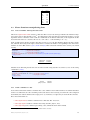
Consequently, spreadtab proceeds in 3 main stages before \begin{<table environment>} sees the table:
• first, it reads the body of the table, divides it in lines and cells, and in each cell, seeks a possible formula;
• then, it computes the formulas in the cells, taking care for each to previously calculate all the dependent
cells. The calculations are done by the fp package;
• finally, it is necessary to rebuild the table, replacing each formula by its numerical calculated value and
handing over to the environment name specified by the user.
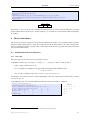
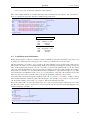
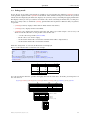
The syntax in both the following is allowed (and equivalent), where <name> is the name of any table environment
available with LATEX or with a package:
1
2
3
\begin{spreadtab}{{<name>}{<parameters>}}
table with formulas and numbers
\end{spreadtab}
1
or
2
3
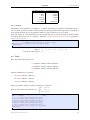
\spreadtab{{<name>}{<parameters>}}
table with formulas and numbers
\endspreadtab
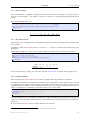
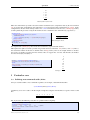
After the work of spreadtab, we get a display as if we had written:
1
2
3
\begin{<name>}{<parameters>}
table with numbers
\end{<name>}
Although having features resembling those of a spreadsheet with LATEX is appreciable, the 3 stages described
above take time, and above all, fp is slow in its calculations. The spreadtab environment leads to much slower
compilation than with a classical table.
Moreover, spreadtab cannot stand in for a spreadsheet program. Indeed, it has very few features, and it does not
provide visual assistance. This point may cause difficulty1 for big or complex tables. The syntax of spreadtab is
also another difficulty. However, the advantage of this package is that it makes it possible to write in the LATEX
code tables involving calculation when these tables are usually exported2 from a spreadsheet program to LATEX
code. Consequently, it becomes possible to avoid the disadvantages of the exportation programs: fine tuning
often necessary to obtain exactly what you want, exported tables containing the values only (formulas are lost
when exportation is done), no compatibility with all types of environments, exportation must be started again if
a single number or formula is modified in the table.
1.2
Motivation
A few months before I started to write this package, Derek O’Connor had pointed out that nothing was available
in the world of LATEX packages to imitate – even a little – the behaviour of spreadsheet programs. I found the
challenge interesting and I started writing this package as a good programming exercise.
The road was long before reaching this version and I especially want to thank Christophe Casseau for his
early interest and for the suggestions he made, and more recently Derek O’Connor for his advice and for the
constructive discussions we have had. I also thank Andrew Parsloe for proofreading the english translation of
this manual.
1I
2I
certify that, with use, this discomfort tends to disappear (if you do not work with huge tables, of course).
mention the two main exportation programs: cacl2latex for ‘calc’ (Open Office), and excel2latex for ‘excel’ (Microsoft Office).
LATEXed by Christian Tellechea, the November 6, 2014.
2