1
4/8-CH DVR Quick Start Guide
1. Install Hard Drive &DVD Writer
1.1 Install Hard Drive
Notice: 1. Support two SATA hard drives. Please use the hard drive the manufacturers recommend
specially for security and safe field.
2. Please disconnect the power before being connected to other devices. Don't hot plug in/out
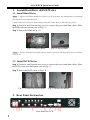
Step 1: Unscrew and Open the top cover to connect the power and data cables. Place
the HDD onto the bottom case as Fig 1-1.
Step 2: Screw the HDD as Fig 1-2.
Fig 1-1 Connect HDD
Fig 1-2 Screw HDD
Notice: 1. For the convenience to install, please connect the power and data cables firstly, and then
screw to fix.
1.2 Install DVD Writer
Step 1: Unscrew and Open the top cover to connect the power and data cables. Place
the DVD writer onto the bottom case as Fig 1-3.
Step 2: Screw the DVD writer as Fig 1-4.
Fig 1-3 Connect the DVD Writer
Fig 1-4 Screw the Writer
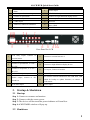
2. Rear Panel Instruction
Rear Panel for 4 CH
1