1
DesignView® Presentation System
APPENDIX - NEC PROJECTOR
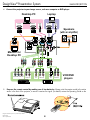
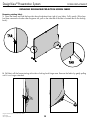
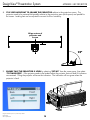
8. IT IS VERY IMPORTANT TO SQUARE THE PROJECTOR relative to the projection screen. The
projector needs to be centered horizontally relative to the projection area (white space) and parallel to
the screen. Leveling feet can be adjusted to account for floor variability.
Align centers of
projector and
screen
Parallel
90º
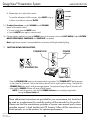
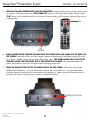
9. ENSURE THAT THE PROJECTOR IS LEVEL by selecting “SET-UP” from the screen menu, then select
“TILT INDICATOR”. If the projector needs to be leveled adjust the projector feet until both tilt indicators
are centered. Tilting the projector will move the indicators. The indicators will turn green when the
projector is level.
DesignView Presentation System is a product of Skyline Exhibits
Patents Pending
©2011 Skyline Exhibits
18