1
Mounting & Connecting the Booster
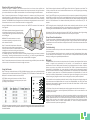
Overview: The signal is received by the outside antenna from the cell tower, then amplified and
transmitted to your phone through the inside antenna. When the phone transmits, the signal is received
by the inside antenna, then amplified and transmitted to the cell tower through the outside antenna.
Step 2: After turning on the booster, the ALERT lights will flash for 10 to 15 seconds on each band. This
is to let you know that each band is activated. When booster is on, the LED light will glow, indicating
that the booster is ready to use.
Step 1. Connect the Outside Antenna. The fiberglass antenna is for outdoor use only. Select an outside
mounting location. For best performance, try to keep the antenna on top of the house. The outside
antenna should be located in an area with at least a 12” radius clear of obstructions, and other radiating
elements. The CM288W full-band fiberglass antenna includes mounting equipment to mount to either a
flat horizontal surface or a wall. It should be mounted in an upright position.
Step 3: If the ALERT lights for any band continue to blink, turn down the respective blinking knob(s) by
another 5dB, for example, from 65 to 60, or until the light stops flashing. If it any band’s lights continue
to blink, unplug the power cord, reset the dials by 5dB less than your previous setting and plug the unit
back in or restart thebooster. If the booster automatically shuts downs, it will restart every 15 – 20
seconds.
Using the CM400 cable, connect the outside antenna to the “OUTSIDE” connector of the booster and
hand tighten it.
NOTE: During this process of adjusting dBs for either band, continually monitor the bars on your cell
phone to see if the reception has improved or has decreased to its original setting before purchasing
or installing the booster.WARNING: Never operate the booster with the red light on.
NOTE: Ideal separation distance between the inside
and outside antennas is at least 75 feet apart with
a weak outside cell signal and the booster operating
at full 65dB gain.
Safety Warning: The input voltage for the booster is 6V. DO NOT use this booster with a higher voltage
power supply, which could damage the booster and the user may also be injured.
Output Power Considerations
WARNING: The outside antenna must not be
co-located or operating in conjunction with any
other antenna or booster.
Step 2. Connect the Inside Antenna. Mount the
dome antenna on the ceiling in a central location
where you want reception. The CM222W Dome Antenna
is designed to mount on the ceiling and includes the
mounting equipment to accommodate a ceiling mount
or L-Bracket wall mount. Drill a hole of 35mm in the ceiling. Screw the fixing nut to fasten the antenna
on the ceiling. The ceiling’s thickness should be no more than 4/5 ” or 20mm. Using the CM400 cable,
connect the dome antenna to the side of the booster marked INSIDE. Hand tighten.
Step 3. Connect the power cord to the booster, and then connect the plug to 110V AC power outlet. Make
sure that all of the connections to the booster are tight and secure.
Using the Booster
Step 1: When you receive the booster, the PCS (1900 MHz frequency) dial on top, the Cellular (800 MHz
frequency) dial in the middle and the Verizon LTE (700 MHz), AT&T LTE (700 MHz) or T-Mobile AWS (2100
MHz) dial on the bottom should be each set at 65dB.
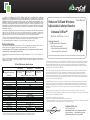
NOTE: Before turning on the booster, set Cellular, PCS and
LTE/AWS dials according to the coverage space you require
by looking at the chart below.
Alert
PCS
Alert
CELLULAR
Alert
LTE / AWS
NOTE: Correct antenna separation is vital for making the booster amplify the cell signal as efficiently and
powerfully as possible. Antenna separation is defined as a straight line measurement between outside
and inside antenna.
The rated output power of this booster applies to single-carrier operation. If multiple carrier signals are
present, reduce the rating 3.5 dB by reducing input power or gain, especially where the output signal
is re-radiated and can cause interference to adjacent band users. Do not connect an attenuator to the
booster output.
Troubleshooting
If the booster interferes with your radio or other electronic receivers, move the booster further away
from those devices.
For a list of Frequently Asked Questions and a complete, up-to-date Troubleshooting Guide, please
visit our website at: www.surecall.com. You may also consult a Cellphone-Mate technical specialist
directly by emailing us at support@Cellphone-Mate.com.
Warranty
1. Cellphone-Mate, Inc. warrants to the buyer that each of its products, when shipped will be free from
defects in material and workmanship and will perform in full accordance with applicable
specifications. The limit of liability under this warranty is, at Cellphone-Mate, Inc.’s option, to repair or
replace any product or part thereof which shall within TWO YEARS of purchaseas determined by
examination by Cellphone-Mate, Inc., prove defective in material and/or workmanship. Warranty
returns must first be authorized in writing by Cellphone-Mate, Inc. Disassembly of any Cellphone-Mate,
Inc. product by anyone other than an authorized representative of Cellphone-Mate, Inc. voids this
warranty in its entirety. Cellphone-Mate, Inc. reserves the right to make changes in any of its products
without incurring any obligation to make the same changes on previously delivered products.
2. As a condition to the warranties provided for herein, the Buyer will prepay the shipping charges for
all products returned to Cellphone-Mate, Inc. for repair, and Cellphone-Mate, Inc. will pay the return
shipping with the exception of product returned from outside the United States in which case the
Buyer will pay the shipping charges.
3. The Buyer will pay the cost of inspecting and testing any goods returned under the warranty or
otherwise which are found to meet the applicable specifications or which are not defective or not
covered by this warranty.
4. Products sold by Cellphone-Mate, Inc. shall not be considered defective or non-conforming to the
Buyers’ order if they satisfactorily fulfill the performance requirements that were published in the
product specification literature, or in accordance with samples provided by Cellphone-Mate, Inc. This
warranty shall not apply to any products or parts thereof which have been subject to accident,
negligence, alteration, abuse, or misuse. Cellphone-Mate, Inc. makes no warranty whatsoever in
respect to accessories or parts not supplied by it.