1
TECHNICAL BULLETIN
[Issue No.] FA-A-0085
[Page] 2/4
[Title] Method for recovering from an error (error code 1) of the MELSEC-Q series load cell input
module
[Date of Issue] June 2010
[Relevant Models] Q61LD
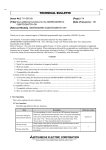
2. Method for recovering from an error (error code 1)
(1) Setting procedure
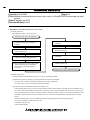
The setting procedure is as shown below.
Start (The error code 1 is detected.)
(a) Restart the system by resetting or
powering off and then on the CPU
module.
(b) Turn on Two-point calibration mode
switch request (YA).
(c) Set User setting (1H) to Two-point
calibration method setting (Un\G41).
(d) Write the default two-point setting value
and the default two-point calibration
value to the corresponding buffer
memories.
(e) Set Write (1H) to Two-point setting
(Un\G40).
(f) Turn off, on, and then off Two-point
setting request (Y7).
(g) Check that the conversion range is not
exceeded.
(h) Turn off Two-point calibration mode
switch request (YA).
End (Perform two-point calibration again.)
(2) Details of each step
The following describes the details of steps (a) to (h) in (1) Setting procedure.
(a) Restart the system by resetting or powering off and then on the CPU module.
The error code 1 cannot be cleared by turning on Error clear request (YF).
To clear it, reset or power off and then on the CPU module.
(b) Turn on Two-point calibration mode switch request (YA).
After restarting the system, turn on Two-point calibration mode switch request (YA) while Conversion disable (1H) is
set to Conversion enable/disable setting (Un\G0). (The error code 1 may be detected when an incorrect value is set to
Two-point setting value (Un\G50 to Un\G54, Un\G56 to Un\G60, Un\G62 to Un\G71) or Two-point calibration value
(Un\G80 to Un\G87) while Conversion enable (0H) is set to Conversion enable/disable setting (Un\G0) in normal
mode.)
When the module enters two-point calibration mode, the signals and LED enter the following status.
y Two-point calibration mode status (XA): On
y Module ready (X0): Off
y RUN LED: Flashing
HEAD OFFICE : TOKYO BUILDING, 2-7-3 MARUNOUCHI, CHIYODA-KU, TOKYO 100-8310, JAPAN
NAGOYA WORKS : 1-14, YADA-MINAMI 5-CHOME, HIGASHI-KU, NAGOYA, JAPAN