1
APPENDIX E
APPENDIX E
(continued)
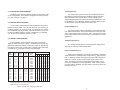
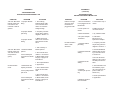
TROUBLESHOOTING
PATTON ELECTRONICS MODEL 1060
SYMPTOM
PROBLEM
"TD" and "RD" LEDs 1. Improper RS-232
indicate activity, but wiring
units will not communicate or data is
garbled
2. Improper twisted
pair wiring
3. Improper bit rate
setting
"TD" and "RD" LEDs
indicate activity, but
"CD" LED is unlit or
red (should be
green)
1. Defective twisted
pair line
2. Poor twisted pair
connections to Model
1060s
SOLUTION
1. Check wiring
between Model 1060
and connected serial
device—it should be
straight through
1. Distance/bit rate
capacity exceeded
2. Poor quality twisted
pair circuit
3. Poor twisted pair
connections to Model
1060s
17
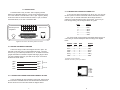
SYMPTOM
LEDs do not light
when AC power
transformer is
plugged into wall
2. Compare your twisted pair wiring with the
diagram in Section 4.1
3. Make sure the bit
rates on all connected
serial devices are the
same
No data transfer in
either or both
directions
PROBLEM
2. Check screw terminal/RJ-11 connections
to Model 1060s; check
integrity of plug RJ-11
terminations
2. Use a different twisted pair circuit if available
3. Check screw terminal/RJ-11 connections
to Model 1060s; check
integrity of plug RJ-11
terminations
SOLUTION
1. The AC transformer
is not plugged into the
Model 1060
1. Have another cup of
coffee!
2. Loose power connection
2. Make sure the AC
connection is flush
3. Outlet is defective
3. Try a different outlet
4. AC power adapter
is defective
4. Call Patton
Electronics for a
replacement adapter
1. Improper twisted
pair wiring
1. Compare your twisted pair wiring with the
diagram in Section 4.1
2. Improper DCE/DTE
setting
2. Set both DCE/DTE
switches alike, according to the instructions
in Section 3.2
1. Test continuity of
twisted pair line
1. Check specifications
in Appendix B
Occasional data
errors
TROUBLESHOOTING
PATTON ELECTRONICS MODEL 1060
3. Improper bit rate
setting
3. Be sure all bit rate
settings on all connected serial ports are the
same
4. Improper
"control input" pin setting
4. The transmitter must
be enabled by a specific "control input" pin
(refer to Table 1 in
Section 3.3)
5. Check specifications
in Appendix B
5. Distance specifications exceeded
18