1
Operation
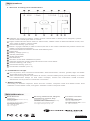
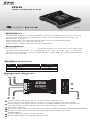
1. Screen overlay and illustration
1
2
8
9
3
10
4
5
11
12
7
6
13
14
15
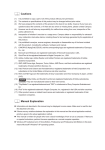
1 Indicator for serial port status, visible symbol means data of serial port is irregular, symbol
vanish means serial port data is normal.
2 Flight mode indicate:”GPS” refers to GPS-mode, ”MSM” refers to Manual Altitude-mode, and
”GH” refers to Return Home-mode.
3 Horizontal-velocity (unit: km/h).
4 Return voyage indicate,in order to return,the dot on the circle indicates the position where the
rudder of remote should been .
5 Horizontal-distance between aircraft and takeoff point.
6 Flight time.
7 Battery voltage (unit: V).
8 Vibrate parameter.
9 Shake parameter.
10 Roll direction.
11 Number of the GPS satellites acquired.
12 Azimuth angle,the upward gap indicate the due north status.
13 Vertical-velocity (unit: m/S).
14 Horizontal-velocity (unit: m).
15 Accelerator indicate (unit: %).
2. Installation steps
1 Cut off power, and connect AV-transmitter, WIFI-transmitter, camera, gimbal, flight controller
and OSD as the user manual.
2 After reconfirming all the connection is correct, connect OSD power port with battery. For OSD
red indicate-LED keeps on and video overlaps, means the instruction install success.
Otherwise cut off power to check the connection.
3. Mode switch
According to different requires, there are two modes, compact mode and detail mode. Red
indicator means detail mode, and green indicator means compact mode.
Distribution
North America
Distributed by :
HRP Distributing
2034 South 3850 West Salt Lake City,
UT 84104 USA
For customer service please contact
Support@ttrobotixusa.com
Support@thundertigerusa.com
Tel : 1-844-887-6268
Attn : TT Support
Germany, Netherlands, Belgium,
Luxembourg, Austria, Italy
Distributed by / Vertrieb :
THUNDER TIGER EUROPE GmbH,
Rudolf-Diesel-Str. 1, 86453 Dasing, Germany
For customer service please contact
service@thundertiger-europe.com
For Other Countries
Distributed by :
Thunder Tiger Corporation
No.7 6th Road, Industry Park,
Taichung, Taiwan 40755
For customer service please contact
service@thundertiger.com
Tel : 886-4-23591632
thundertiger.com
JC7406V2