1
Knowing your device
MAP MODE..........................................................................................................16
MEMORY STATUS...............................................................................................16
PAGE SETTINGS..................................................................................................16
PROFILES.............................................................................................................. 17
RECORDED DATA............................................................................................... 17
SLOPE.................................................................................................................... 17
SYS UPGRADE..................................................................................................... 17
SYSTEM.................................................................................................................18
Managing data on the device
Main unit
19
Installing the PC utility......................................................................................19
Sharing your experience on the Internet........................................................19
For more information
19
Online support....................................................................................................19
Caring for your Magellan cyclo........................................................................19
Troubleshooting................................................................................................. 20
What is GPS?...................................................................................................... 20
IPX7........................................................................................................................21
Safety precautions..............................................................................................21
Regulatory information.....................................................................................21
WEEE.....................................................................................................................21
End User License Agreement............................................................................22
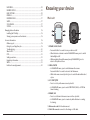
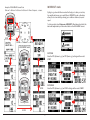
1. POWER / LIGHT / BACK
• Press and hold for 2 seconds to turn your device on/off.
• When the device is turned on and in DASHBOARD menu, press to switch
the backlight on/off.
• While navigating through the menus(except DASHBOARD), press to
return to the previous screen.
2.MENU / ENTER
• In DASHBOARD menu, press to switch between the screens.
Press and hold for 2 seconds to return to the Main menu.
• While in the menu screen/option list, press to select the desired function/
option.
3.UP / START|STOP
• Press to scroll up in the menu screen/option list.
• In DASHBOARD menu, press to select CONTINUE, PAUSE, or STOP the
timer in training.
4.DOWN / LAP
• Press to scroll down in the menu screen or in the option list.
• In DASHBOARD menu, press to create a lap while the timer is counting
for training.
5.Bike mount socket: for the device mount.
6.Mini-USB connector: connects to the charger or USB cable.
3