1
CONTENTS OF PACKAGE
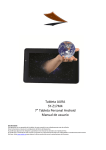
HELIOS SY-Z18M4 Tablet 4GB
User Manual
USB OTG 2.0 High speed Cable for PC connection
AC/DC power adaptor – 100-240V AC 50-60Hz
Leather pouch
In ear Earphones
PICTURE DESCRIPTION
1.
2.
3.
4.
5.
6.
Volume – / +
Return
Front Camera
On/Off button
Earphone Jack
Mini USB interface
7.
8.
9.
10.
11.
AC Adaptor input
Reset
SD card slot
Rear Camera
Loudspeaker
TURNING ON AND OFF THE UNIT
To switch on your HELIOS SY-Z18M4 tablet, press the On/Off button (1), located on the top right hand side of the unit, for a
few seconds. Before being able to use the unit you will have to unlock the device. Drag the padlock towards the right (wave
icons will be shown to indicate in which direction to move the padlock).
To turn off the unit, press the On/Off button (1) for a few seconds and the unit will turn off completely. If you press the
On/Off button (1) once, the unit will enter into power saving mode.
NOTE: To turn off the unit, you must
press and hold the On/Off button. If
it is only pressed the unit will only
turn off the screen.