1
•
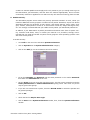
Click Save when finished with that patron-item policy combination. Then click on the
Exceptions button which should then turn yellow. An Alert icon will appear on the tab
where the exceptions have been made, but you will not be able to see the exception without having that tab in focus and clicking on the Exceptions button again. Then the field
with the red outline will mean that that is where the exception is and the exceptions value
is the one showing.
•
Repeat on all patron-item policy combinations until you have made all the exceptions that
you want.
To set call number mapping:
•
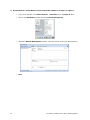
Go to Edit on the menu bar and select System Preferences.
•
Click on Cataloging in the Management category.
•
Click on the Policy Mapping tab
•
Click on the Add (+) icon in the bottom-left corner of the window.
•
Fill in the Starting With and Ending With fields with call numbers to represent the range
of the call numbers to be assigned to a certain policy
•
Fill in the Library/Site if you are in a Central Union system.
•
Select the appropriate policy from the drop-down menu at the bottom of the window.
•
Click on Save on the window.
•
Repeat until you have set all call number mappings that you want to set.
•
Click on Save on the System Preferences window.
C. Calendars
Alexandria v6 Public Library Basic Training Manual
59