1
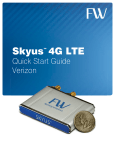
Skyus DS Quick Start Guide
Installation
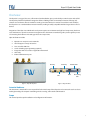
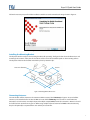
The following sections describe the installation and initialization of the Skyus DS. This procedure assume that your
Skyus DS contains one or two activated SIMs.
Installation Summary
•
•
•
•
•
•
•
•
Inspect the package contents and compare against the packing list.
Install the Sierra Wireless driver.
(Optional) Install the Skyus DS mounting bracket and mount the unit to the bracket.
Connect the antenna(s).
Connect the Skyus DS to the computer or router using the USB cable.
Activate the SIM, if necessary.
Wait for Over-the-Air provisioning, if necessary.
Install the connection manager.
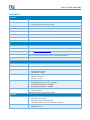
Package Contents
Package contents depend on the accessories ordered. Compare the contents with the packing list. If any items are
missing or damaged, contact FW support.
Item
Type
Description
Skyus DS
Included
Skyus DS LTE Device with one or two SIMs installed
Cable
Included
USB 2.0 Type A Male to Mini B Male
Mounting Bracket
Accessory
Skyus DS mounting bracket
Antenna(s)
Accessory
FW offers several antennas that meet the Skyus DS antenna specifications
Skyus DS Multipurpose Tool
Included
Used for grounding the SIM port and for SIM insertion and ejection
Installing the Sierra Wireless Driver
The Skyus DS uses an internal Sierra Wireless radio module. Drivers for Windows 7 and Windows 8 based platforms
are provided in binary form by Sierra Wireless and are available for download on the FW website. For quick
connection, download a driver only package directly from the FW Downloads page.
Under Skyus 4G Drivers click Download Files to begin downloading the driver file for installation.
If you are working on the device you intend to use the Skyus DS with, proceed with installation on the local drive. If
you are working on a separate device from the one you intend to use the Skyus DS with, save the file to a portable
media device and use it to install the drivers on the separate device.
Begin the installation of the Sierra Wireless drivers by clicking on the executable driver installation file. The setup
utility will start up.
5