1
System status
Alarm sirens
Press Status (no code is required) to cause the system to
display and speak the following types of information:
Exterior and interior sirens make three different alarm
sounds on the premises, each indicating a different type of
alarm. Sirens are programmed by the installer to time out
and stop sounding after a specified time.
•
•
•
•
•
Alarm conditions
Alarm history
Trouble conditions
Open sensors
Bypassed sensors
The Status button blinks when an active alarm exists. The
Status button is lit when an abnormal condition such as a
trouble or open sensor exists in the system.
You can clear certain status entries from the system (such
as old alarm history) by pressing Disarm after checking the
status.
Touchpads and key fobs
You can use touchpads and key fobs to control the security
system from remote locations in and near your home.
Interfacing with the system using a touchpad is similar to
using the panel. Refer to the Simon XT User Manual and the
touchpad or key fob documentation for details.
Status beeps
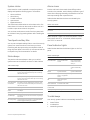
Table 4 below describes the siren sounds used by the
security system.
Table 4: Siren sounds
Function
Fire
Intrusion
Emergency
Interior and
panel siren
Temporal 3
Steady
Fast on/off
Exterior siren
Temporal 3
Steady
Note: Temporal 3 refers to a continuous pattern of three
siren pulses, then off for 1.5 seconds, three siren pulses,
then off for 1.5 seconds.
Panel indicator lights
Table 5 below describes the indicator lights on the front
panel.
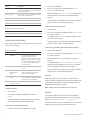
Table 5: Indicator light
Button
When button light is on
When button flashes
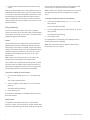
The panel sounds status beeps to alert you to various
system events and conditions as shown in Table 3 below.
Doors+Windows
Doors and windows
armed
Doors and windows
armed and no entry
delay on
Table 3: Status beeps
Motions
Motions armed
Motion sensors
armed and latchkey
on
Disarm
System disarmed
System subdisarmed
Status
System trouble, open
sensor, or bypassed
sensor
System in alarm
OK
There are no open
sensors
Chime (solid bell)
Door will cause chime
Motion will cause chime
Latchkey feature on
Activity
Beep response
Doors+Windows
Exit delay and entry delay beeps sound two times
every 5 seconds and two times per second during
the last 10 seconds.
Motions
Doors+Windows
and Motions
Exit delay and entry delay beeps sound three times
every 5 seconds and three times per second during
the last 10 seconds.
Exit delay and entry delay beeps sound four times
every 5 seconds and four times per second during
the last 10 seconds.
Disarm
One beep.
Special chime
(outlined bell)
Chime
Two beeps.
Latchkey on (key)
Special chime
Three beeps.
Trouble beeps
Six beeps every minute. Press Status to stop beeps
for 4 hours.
Trouble beeps
No activity beeps
Twenty beeps every minute for 5 minutes (feature
must be programmed by the installer).
Your security system is able to automatically test itself for:
•
•
•
Simon XT V2 Quick Operation Guide
Power failures
Low batteries
Nonworking sensors
3