1
Description
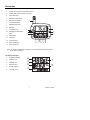
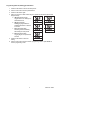
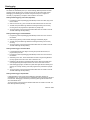
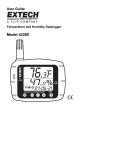
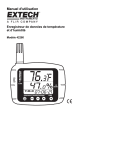
Meter Description
1.
Humidity Sensor (internal Temperature sensor)
2.
Audible alarm (with AC adaptor power only)
3.
Visual Alarm LED
4.
Relative Humidity display
5.
Date and Time display
6.
Temperature display
7.
RECORD status LED
8.
USB port
9.
AC Adaptor jack
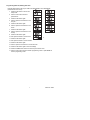
10. Datalogger START-STOP
button
1
2
4
6
3
7
5
8
9
11. MODE button
12. SET button
13. Up Arrow button
10 11
14. Down Arrow button
15
12 13 14
15. Tripod mount jack
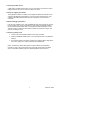
Notes: The battery compartment is located on rear of instrument. Desktop stand footers
are not shown in diagram.
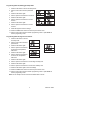
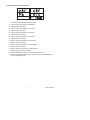
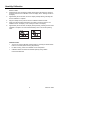
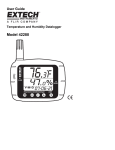
LCD Display Description
1.
Temperature Display
2.
Dew Point icon
3.
Datalogger icon
4.
Date and Time
5.
Humidity Display
6.
Low battery icon
DP
2
3
6
4
REC
Y-M-D
H:M:S
3
1
% 5
42280 V4.0 10/2007