1
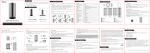
Analogue connection 1. Connect one 3.5mm end of the include audio to headphone jacket on the AA-2108 2. Connect the other end to an audio input on your home stereo system (3.5mm or 3.5mm + 3.5mm2 RCA). Consult your stereo user’s manual for more information on how to accomplish this. 3. Consult your stereo user’s manual for more information on how to accomplish this. 4. Connect USB A to micro USB adaptor cable, the micro USB end to the micro USB jacket of AA-2108, USB Type-A connector to the USB port of your Audio Video Device or you can connect to an AC Adaptor with USB port (option), the AC end to any AC outlet. 5. The LED light will flash once to show the unit is powered and ready for being paired for your devices. NFC Fast connection and Pairing of AA-2108 Before you can use this feature, you need to check your Smartphone or tablet with NFC function and the operational system is Android 4.1 and above. Start the NFC function. STEP1: Check the Android operational system Tab the “setting” Choose “about Device” Make sure android version Is 4.1 or above 3 Step 2 : Turn on the NFC function