1
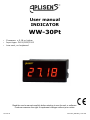
User manual for - INDICATOR WW-30Pt
!
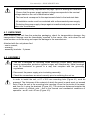
- Read the basic safety requirements on page 3 prior to starting the installation.
- Ensure that the power supply network voltage corresponds to the nominal
voltage stated on the unit’s identification label.
- The load must correspond to the requirements listed in the technical data.
- All installation works must be conducted with a disconnected power supply.
- Protecting the power supply clamps against unauthorized persons must be
taken into consideration.
4.1. UNPACKING
After removing the unit from the protective packaging, check for transportation damage. Any
transportation damage must be immediately reported to the carrier. Also, write down the unit
serial number on the housing and report the damage to the manufacturer.
Attached with the unit please find:
- user’s manual,
- warranty,
- assembly brackets - 2 pieces.
4.2. ASSEMBLY
!
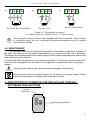
- The unit is designed for mounting inside housings (control panel, switchboard)
insuring appropriate protection against surges and interference. Metal housings
must be connected to ground in a way that complies with the governing
regulations.
- Disconnect the power supply prior to starting assembly.
- Check the connections are wired correctly prior to switching the unit on.
!
6
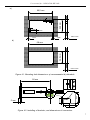
In order to install the unit, a 67 x 32.5 mm mounting hole (Figure 4.1) must be
prepared. The thickness of the material of which the panel is made must not exceed
5mm. Place the unit in the mounting hole inserting it from the front side of the panel,
and then fix it using the brackets (Figure 4.2). The minimum distances between the
centre points of multiple units - due to the thermal and mechanical conditions of
operation - are 91 mm x 57mm (Figure 4.3).