1
PT2100 8” TELEPROMPTER
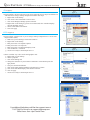
ASSEMBLY INSTRUCTION
1
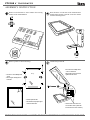
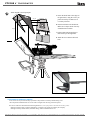
Remove T-Nut from Part-A. Insert T-Nut in the receiving
channel of the V8000 Monitor.
2
Place the Part-L on both sides of the V8000 monitor.
Attach V8000 monitor to Part-K. Secure the monitor
with the remaining Part-A.
Part-A
k
-Hoo
o
Velcr
+
+
+
+
Part-K
Part-A
3
4
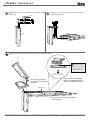
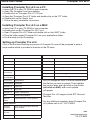
Remove protective film from Part-Q.
Attach Part-Q to Part-K.
> Unscrew the two Phillips Head
screws on the Part-K
> Attach Part-Q to the Part-K and
tighten with the screws
Part-Q
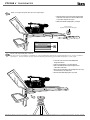
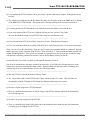
> Unscrew 4 x small Phillips Head
screws
> Remove glass holding tabs on
both sides
Part-Q
Part-D
Part-K
> Peel the protective film
> Re-install the Teleprompter glass
back into metal frame
Part-H
> Install 4 x Part-D on Part-K and
secure with 8 x Part-H (Place the
Part-D on the inner sides of Part-K)
3903 Stoney Brook Dr. Houston TX 77063 | +1.713.272.8822 | www.ikancorp.com | support@ikancorp.com | © 2009 ikan Corporation. All right reserved.