1
Smart Machine Smart Decision
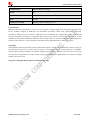
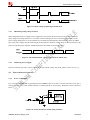
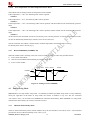
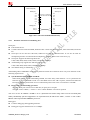
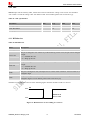
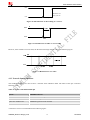
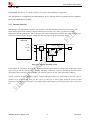
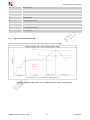
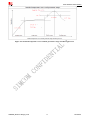
Figure 13: Timing of power down SIM900E by PWRKEY
This procedure makes the module log off from the network and allows the software to enter into a secure state to
save data before completely shut down.
Before the completion of the power down procedure, the module will send URC:
NORMAL POWER DOWN
At this moment, AT commands can not be executed any more, and only the RTC is still active. Power down mode
can also be indicated by STATUS pin, which is at low level at this time.
4.2.2.2
Power down SIM900E by AT Command
SIM900E can be powered down by AT command “AT+CPOWD=1”. This procedure makes the module log off
from the network and allows the software to enter into a secure state to save data before completely shut down.
Before the completion of the power down procedure, the module will send URC:
NORMAL POWER DOWN
At this moment, AT commands can not be executed any more, and only the RTC is still active. Power down mode
can also be indicated by STATUS pin, which is at low level at this time.
For detail about the AT command “AT+CPOWD”, please refer to document [1]
4.2.2.3
Over-voltage or Under-voltage Power down
The module software monitors the VBAT voltage constantly.
If the voltage ≤ 3.3V, the following URC will be reported:
UNDER-VOLTAGE WARNNING
If the voltage ≥ 4.7V, the following URC will be reported:
OVER-VOLTAGE WARNNING
If the voltage < 3.2V, the following URC will be reported, and the module will be automatically powered down.
UNDER-VOLTAGE POWER DOWN
If the voltage > 4.8V, the following URC will be reported, and the module will be automatically powered down.
OVER-VOLTAGE POWER DOWN
At this moment, AT commands can not be executed any more, and only the RTC is still active. Power down mode
can also be indicated by STATUS pin, which is at low level at this time.
SIM900E_Hardware Design_V1.00
21
2013-02-02