1
Operation Test
Turn Off the UPS
Push the “Off” Switch for at least 3 seconds to turn off the UPS. If you press the “Off” Switch less than 3 seconds, the UPS will not execute shutdown
command due to insufficient pressing time.
In some occasions, the UPS will shut itself down in case of overload, output short-circuited or battery cutoff point reached in the Backup mode.
The UPS will automatically shut off the output and beep for 5 seconds then completely shut itself down.
Plug-in Charge
If the Input Power Cord is connected to the wall receptacle properly and the utility is normal, the UPS will start to charge automatically without
processing “Turn On” procedure. You have to charge for at least 8 hours every 3 months to avoid from battery self over-discharge naturally, if the UPS
is in an idle condition.
Auto-Restart
The UPS will automatically restart to provide energy to the output if the utility recovers in 24 hours after battery cut. The “Backup LED” will flash every 5
seconds under the waiting situation. On the contrary, the UPS will not auto-restart if the Utility doesn’t recover within 24 hours. You are required to
start up the UPS manually. If you don’t need UPS auto-restart, you can turn off the UPS by proceeding the “Turn Off” procedure.
Alarm Silence
The Alarm might be turned off by pushing the “On” Switch for approximately 1 second in the “Backup” mode. Unless any other warning or fault condition
occurs, the alarm remains at Silence condition once the “Alarm Silence” is turned off.
Test
Under Utility Normal condition, push the “On” Switch for 3 seconds to execute the Battery Self-test function. In case the battery is normal, it will enter
into Battery Backup Mode for 10 seconds then return back to Utility Mode. If the battery voltage is detected lower than set limit, the Battery
Replacement LED will blink for 5 seconds then extinguish to stop self-test procedure. And if battery is detected weak or dead, the Battery
Replacement LED will steadily illuminate.
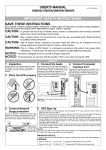
FRONT PANEL EXPLANATIONS
REAR PANEL EXPLANATIONS
1. Utility LED
2. Fault LED
3. On Switch
4. Off Switch
5. Battery Replacement LED
6. Battery Backup LED
7. Screw for Easy Swappable Battery
Cover
8. Battery Low
9. Bypass
10. Utility Low, UPS Boost
11. Utility High, UPS Buck
12. UPS Output Indicator
13. Polarity Error or Ground Fault
14. Over load
15. Load/Battery Level(%)
16. Load/Battery Level Indication
Control Button
RJ45 Port
DIP Switch
USB Communication Port
RS232 Communication Port
Internal CPU Reset Button
(press to shutdown)
6. Output Breaker
7. Outlet
8. Rating Label
9. Input Fuse
10. Input Power Cord(Inlet)
1.
2.
3.
4.
5.
REPLACING THE BATTERY
Note: Once the battery is disconnected, the loads are not protected from power outages.
When the Battery Replacement LED(Red) lights up, you may leave the UPS to be re-charged for at least 8~10 hours to see whether the
Red LED will be extinguished after the Self-test Function is executed again. In case the Red LED remains unchanged, you may unscrew
the Easy Swappable Battery cover, replace a new battery than push the “On” Switch to disable the RED LED. Please follow the steps 1-7
to replace the new battery
STEP 7
STEP3
STEP 2
STEP 6
STEP 1
STEP 4
STEP 5
DIP SWITCH SETTING
The voltage & frequency of the UPS might be re-set by the DIP
Switch on the rear panel of the UPS. The following charts may
bring you clear pictures about how the settings are done by the
DIP Switch.
INDICATORS & ALARMS
Indicator
Color
Description
Alarm
Utility Mode
Green
None
Backup
Mode
Amber
Fault
Red
Steady:
Output Load is supplied by Utility.
Blinking:
Polarity error or Ground Fault
Steady (with alarm):
Output Load is supplied by Battery
Blinking every 5 seconds(no
alarm):Stand by for Utility
recovery to re-start up
When Overload, short circuit, or
Output Voltage Abnormal occurs
Blinking: Battery is weak and
needs to be recharged.
Steady: Battery is dead.
None
Battery
Red
Replacement
Every 2 seconds
before battery Low
and every 1 second
before battery Cutoff.
Buzzer beeps
continuously.